
Structured Cabling for New Businesses: A Complete Guide
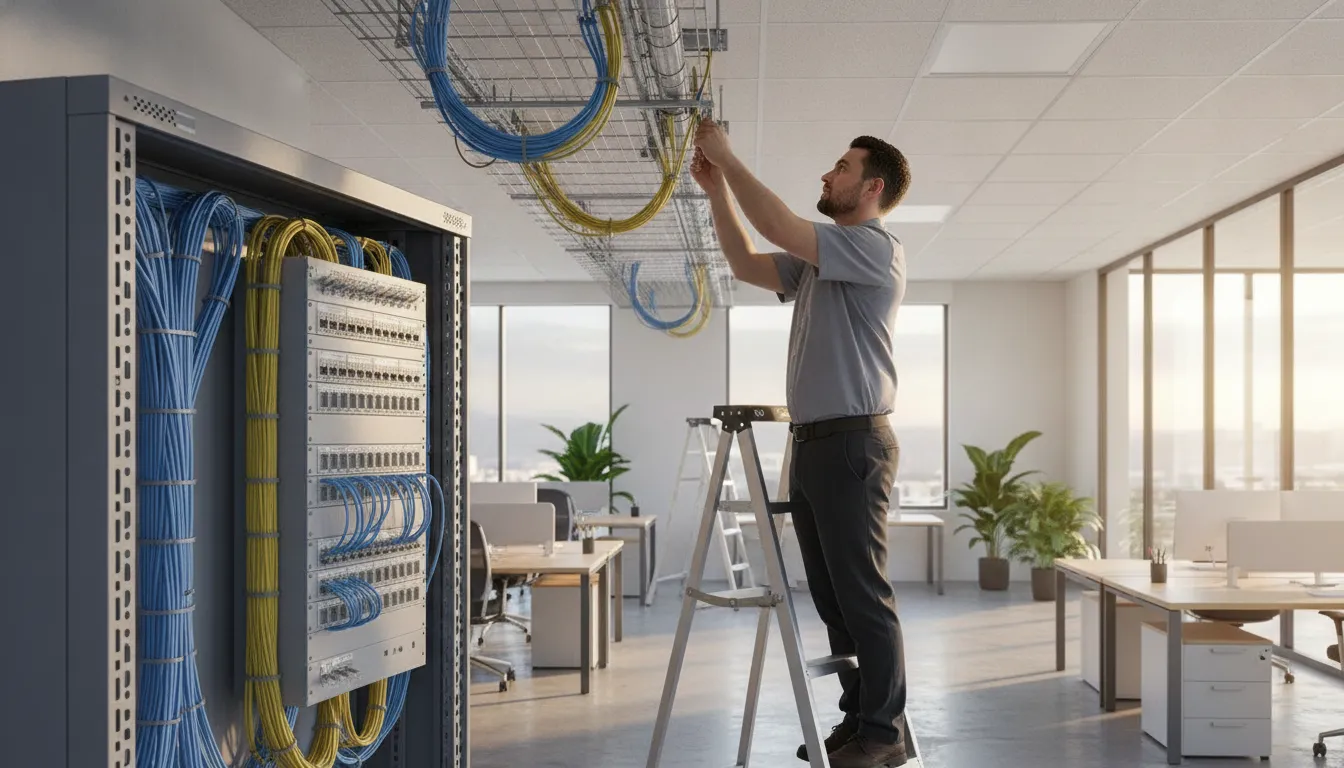
Opening a new business is the right time to plan the infrastructure your team, customers, and security systems will depend on. Installing network wiring after walls are finished can create avoidable disruption, added labor, and limitations that are difficult to correct.
Structured cabling for new businesses is a planned network wiring system that connects workstations, phones, wireless access points, cameras, access control, and other devices through organized pathways, equipment rooms, and labeled termination points. InVision Systems can help plan the layout before walls or ceilings close, creating a serviceable foundation for connectivity, security, and future expansion. Request a structured cabling consultation.
For a new commercial space, the goal is not simply to run Ethernet from one room to another. It is to create a dependable foundation that can support today’s operations and future cameras, access control, phones, wireless access points, and other connected systems. Understanding the structure behind that foundation makes it easier to plan the right installation from the start.
What Is Structured Cabling for New Businesses?
Structured cabling is the organized network backbone that connects a new business’s essential technology. Instead of running separate, improvised wires whenever a need appears, the system uses a planned layout of cables, pathways, termination points, and equipment spaces. That backbone can support voice and data networks, wireless access points, security cameras, access control systems, and other connected devices.
Request your free structured cabling consultation today
For a new business, the value starts before the walls are closed or employees move in. A cabling plan maps where people will work, where network equipment will live, and where cameras, readers, phones, and other devices may be needed. Installers can then place the right cable types and capacity in the right locations, label the infrastructure, and leave room for future growth. This is far easier than opening finished walls or routing exposed cable after operations begin.
A planned backbone for voice, data, and security
Modern commercial systems are interconnected. A camera may need a network connection and power. An access control reader may communicate with software located elsewhere in the building. Staff may rely on wired connections for dependable voice and data service, even when much of the workforce uses Wi-Fi. Structured cabling gives these systems a consistent physical foundation, so each can be designed as part of the building rather than added as an isolated project.
That foundation also helps protect performance. According to Teleco, structured cabling may represent a small portion of the overall network investment while accounting for nearly 80% of network efficiency. The exact result depends on the design, equipment, installation, and operating environment. But the principle is important: inexpensive shortcuts in the infrastructure can limit the performance of more expensive technology. See InVision Systems’ commercial security camera installation for a closer look at how professional wiring supports connected facilities.
Why planning before construction matters
Planning early allows a cabling professional to coordinate pathways, equipment rooms, power requirements, ceiling access, firestopping, and security-device locations with the rest of the build. It also creates a documented system that technicians can troubleshoot and expand later. Without that planning, a business may face cable congestion, inconsistent labeling, difficult repairs, or expensive rework when it adds staff and devices.
The broader market reflects how central this infrastructure has become. North America held a 34.2% share of structured cabling market revenue in 2024, according to City Source Solutions. For a new business, the practical takeaway is not the market statistic itself. It is that reliable connectivity is core operating infrastructure, not an optional finishing detail. A site-specific plan gives the business a cleaner, more scalable starting point.
Why Proper Network Wiring Matters Before You Open Your Doors
Opening a new business involves choosing a location, preparing work areas, and connecting the systems your team and customers will rely on every day. Network wiring belongs in that planning stage, not as a last-minute detail after the walls are finished. Professional structured wiring gives your business a dependable infrastructure for internet access, voice communications, security devices, and future technology.
The risk of postponing this work is measurable. Networking and connectivity issues accounted for 31% of IT service-related outages in the Uptime Institute’s 2024 Resiliency Survey, making them the leading reported cause of these incidents (source). A poorly planned network can turn a simple cable problem into lost productivity, interrupted communications, or a security system that cannot reliably transmit video and alerts.
Build for the applications your business will use
Many older networks still operate at 10/100 Mbps speeds. Which can be too slow for the bandwidth demands of modern applications, according to structured cabling guidance from Teleco (source). New businesses should plan cabling around the systems they need now and the systems they may add later. That can include cloud software, point-of-sale devices, wireless access points, VoIP phones, high-resolution cameras, access control panels, and other connected equipment.
Structured cabling also makes these systems easier to expand. When cable pathways, termination points, and network locations are planned in advance, a company can add a workstation. Camera, or access-controlled door without opening finished walls or stringing improvised cables across a facility. This reduces disruption and helps avoid the higher labor and repair costs associated with retrofitting a completed space.
Connect security and communications from the start
Security technology depends on the network beneath it. Cameras need consistent bandwidth to send video, while access control and alarm systems need dependable connections to communicate events and receive commands. A professionally designed wiring plan can coordinate these requirements with business phones and data, rather than treating each installation as a separate project.
For example, businesses planning surveillance should consider cable routes, equipment locations, and capacity before construction is complete. InVision Systems can connect the underlying infrastructure with commercial security cameras and other security components as part of a site-specific design. Planning early creates a cleaner installation, a more serviceable system, and a stronger foundation for the business to grow.
The Core Components of a Structured Cabling System
A structured cabling system is easier to plan when you view it as a set of connected zones rather than a pile of individual cables. Each zone has a specific job, from bringing service into the building to connecting an employee’s computer or phone at the desk. For a new business owner, this approach creates a clean foundation that can support internet access, voice systems, security devices, and future growth.
- Entrance facilities: The point where outside provider services enter the building. This area helps transition incoming fiber, copper, or other service connections into the internal network.
- Equipment room: A secure, central location for core network equipment, such as racks, patch panels, switches, and related hardware. It should have suitable power, ventilation, and room for organized expansion.
- Telecommunications rooms: Intermediate connection points that serve different floors, wings, or work areas. A larger facility may need more than one room so cable runs remain manageable and within design limits.
- Backbone cabling: The vertical or building-wide connections between the entrance facility, equipment room, and telecommunications rooms. Backbone pathways carry traffic between the network’s main distribution points.
- Horizontal cabling: The cable runs from a telecommunications room to outlets or connection points in offices, conference rooms, reception areas, and other spaces. Planning these routes before walls and ceilings are finished can reduce disruptive retrofits.
- Work-area components: The outlets, patch cords, faceplates, and equipment connections used by people and devices at their workstations. These components should be placed where employees and technology will actually be located, not simply wherever installation is easiest.
Plan the pathways, not just the outlets
Good design accounts for pathways, cable capacity, separation from electrical systems, rack location, and access for future service. It also considers how the business may add workstations, meeting-room technology, wireless access points, cameras, or other networked devices. The goal is a system that is accessible and adaptable, rather than one that works only on opening day.
Documentation is part of the installation
Every cable should be labeled consistently at both ends, and the finished system should include updated diagrams or records showing where connections run. Proper labeling and documentation are essential for efficient troubleshooting and maintenance, a requirement covered in university structured cabling standards. Without those records, a simple move or failed connection can become a time-consuming search through an unlabeled bundle.
Before opening a new location, ask your installer to explain what each room and pathway will support. How the cables will be tested, and what documentation you will receive. That practical review helps ensure the infrastructure matches the way your business will operate.
Structured Cabling vs. Ad-Hoc Wiring: What New Owners Should Know
New business owners often begin with the fastest available connection: a few wireless access points. Exposed Ethernet runs, and additional cables added whenever a new workstation or device appears. That approach can work temporarily, but it makes the network harder to understand and more difficult to expand as the business grows. Structured cabling for new businesses creates an organized physical foundation for internet access, phones, cameras, access control, and other connected systems.
The difference is not simply whether a business uses cable or Wi-Fi. It is whether the infrastructure is designed as a complete system, installed consistently, tested, documented, and prepared for future changes. A professional design can account for the building layout, equipment locations, current bandwidth needs, and planned growth. InVision Systems develops custom, site-specific designs rather than treating every new space as the same installation.
| Consideration | Structured cabling | Ad-hoc or Wi-Fi-only setup |
|---|---|---|
| Cost | Requires planned installation at the outset, which can reduce costly rework and retrofit labor later. | May have a lower initial cost, but additions, relocations, and troubleshooting can create unplanned expenses. |
| Reliability | Dedicated, tested pathways provide consistent connections for critical equipment and help reduce avoidable network issues. | Performance may vary with distance, interference, congestion, improvised connections, and changing device locations. |
| Scalability | Organized pathways and room for planned expansion make it easier to add users, devices, and services. | Growth often means adding visible cables, extra wireless equipment, or disconnected workarounds. |
| Troubleshooting | Consistent labeling, documentation, and testing help technicians isolate problems efficiently. | Unlabeled or mixed connections can increase diagnostic time and make ownership of each cable unclear. |
| Future-proofing | Planning around current standards and anticipated bandwidth supports future technology changes. | Older cable types, limited pathways, and equipment-dependent layouts may restrict later upgrades. |
| Integration | One infrastructure plan can support data, voice, cameras, and access control as the business evolves. | Each new system may be added separately, creating compatibility and management challenges. |
Professional structured cabling should follow recognized requirements such as TIA-568 and BICSI standards, which provide benchmarks for design and installation quality. Review the referenced cabling standards for the technical framework. Installation, testing, and ongoing support are equally important, not optional finishing steps. InVision’s structured wiring services are planned around the specific site and the systems the business needs to operate reliably.
How Structured Cabling Supports Phones, Cameras, and Access Control
A new business rarely needs separate, disconnected networks for every low-voltage system. A well-designed structured cabling backbone can carry voice, data, and security communications through an organized infrastructure that is easier to manage and expand. That unified approach supports VoIP phones at workstations, IP cameras throughout the property, alarm communications, and access control systems at doors and restricted areas.
For example, an Ethernet run can connect a desk phone and a computer at the same workstation. While separate runs serve cameras, card readers, intercoms, and wireless access points. The exact layout depends on the building, equipment, bandwidth requirements, and security objectives. The important point is that each endpoint has a planned path back to the appropriate network equipment, rather than relying on improvised extensions added after the business opens.
One backbone, multiple business systems
IP security devices depend on reliable network wiring. Cameras must transmit video consistently, access control readers must communicate with controllers, and alarm systems must report events without unnecessary interruptions. A structured design also makes it easier to separate traffic logically, apply appropriate power and network controls, and identify the source of a problem when troubleshooting is necessary.
This is especially valuable when a business adds more cameras, doors, phones, or connected devices over time. Cabling routes, equipment locations, and spare capacity can be considered during the initial buildout, reducing the need to open walls or run visible cable later. Proper labeling and documentation further support efficient troubleshooting and maintenance, a practice included in university structured cabling standards.
Reliability matters during disruptions
Communications and security systems are not merely conveniences. During an emergency or network disruption, personnel may need phones, cameras, alarms, and controlled entry points to remain available at the same time. The CDC notes that continuity facilities depend on the availability and redundancy of critical communications systems: interoperable communications worksheet. A cabling plan can support that objective by organizing critical connections, allowing appropriate redundancy where required, and making service paths easier to inspect.
InVision Systems designs infrastructure around the complete security ecosystem, including Ethernet wiring for complex installations. If your new facility needs a coordinated camera plan, review the options for commercial security cameras alongside the cabling design. Planning both together helps ensure that the network can support the systems your business depends on from opening day.
What to Look For When Choosing a Cabling Installation Partner
The right cabling partner should do more than pull cable from one room to another. For a new business, the installation becomes part of the building’s operating infrastructure, supporting internet access, phones, cameras, access control, and future expansion. A thoughtful partner will ask how your team works today, where you expect to grow, and which systems must remain available during an outage.
Use the following checklist when comparing providers:
- Recognized qualifications: Ask who will design, install, and test the system, and whether the technicians maintain relevant industry training. BICSI certification is one useful qualification to look for because it indicates specialized knowledge of cabling design and installation practices. BICSI-certified technicians are supported as a quality benchmark in the structured cabling field.
- Custom design: Avoid a one-size-fits-all proposal that lists equipment without showing where pathways, outlets, racks, and network drops will go. The design should reflect the floor plan, construction materials, device locations, bandwidth needs, and likely changes to the space. InVision Systems creates site-specific designs rather than treating every commercial property as the same.
- Commercial and industrial experience: A provider should understand the demands of offices, warehouses, production areas, and multi-entry facilities. Experience with commercial and industrial environments matters when cable routes must coordinate with security devices, active work areas, ceiling conditions, and expansion plans. InVision serves industrial, commercial, and residential clients throughout Chicagoland and the Greater Midwest.
- A complete lifecycle process: Look for a defined process that covers site assessment, design and planning, installation, testing and certification, then documentation and support. This sequence, reflected in a five-step cabling installation process, reduces the chance that important details are missed after the cable is installed.
- Post-installation support: Confirm who will troubleshoot issues, label changes, document additions, and help when your business expands. Proper documentation makes future maintenance faster and less disruptive.
InVision Systems combines custom site planning with direct owner involvement and local Chicagoland market knowledge. That accountability is reinforced by a client retention rate of over 95%, a sign that customers continue to rely on the company after the initial installation. For a new business, selecting a partner that can support the full infrastructure journey is often more valuable than choosing the lowest installation quote. Explore InVision’s structured cabling services to evaluate how your new space can be prepared for reliable connectivity and security.
A Simple Network Wiring Checklist for Your New Space
Planning structured cabling before a new business opens gives your network, phones, security devices, and access systems a dependable foundation. Use this checklist during site planning, and involve your installer before walls, ceilings, and floors are closed.
- Assess the layout and device needs. Walk the space with your IT, operations, and security stakeholders. Mark workstations, wireless access points, printers, phones, cameras, card readers, alarm panels, servers, and equipment rooms. Consider how people and materials will move through the building, where devices need power and data, and which areas may need extra coverage. This early inventory turns an empty floor plan into a practical wiring map. It also helps coordinate network infrastructure with business security systems.
- Design the cabling plan. Map every outlet, pathway, termination point, rack, patch panel, and telecommunications room. Select cable types and routes that fit the expected bandwidth, distance, environmental conditions, and applicable standards. Keep data and security infrastructure organized so future service work does not disrupt daily operations. A complete plan should also show how Ethernet runs will connect cameras, access control, phones, and other business systems.
- Plan for growth and scalability. Do not design only for the devices you will install on opening day. Reserve pathways, rack space, patch-panel capacity, and cable runs for additional employees, cameras, doors, wireless access points, or future offices. Leaving sensible capacity now is usually less disruptive than opening walls later for an expansion. The goal is a network that can grow with the business without requiring a complete redesign.
- Label and document every run. Give both ends of every cable a consistent identifier, then record the cable route, termination point, connected device, and test result. Store updated diagrams and schedules where your facilities or IT team can access them. Properly labeling and documenting cabling is essential for efficient troubleshooting and maintenance, as covered in university structured cabling standards. Documentation is especially valuable when a business changes tenants, adds equipment, or needs emergency repairs.
- Schedule installation before build-out or construction. Coordinate the installation with the general contractor, electrician, ceiling contractor, and technology vendors. Confirm pathway access, sleeve locations, firestopping requirements, rack placement, and inspection milestones before construction limits access. Installing during the appropriate build-out phase reduces rework, visible cable clutter, and delays to opening.
- Test and certify the completed system. Require testing for each installed run, not just a visual inspection. Review results for continuity, performance, labeling accuracy, and compliance with the design. A structured cabling lifecycle should include site assessment, design and planning, installation, testing and certification, and documentation and support, according to the five-step installation process described by Shelby Communications. Keep the certification records with the final wiring documentation so future upgrades begin with reliable information.
With the plan, installation schedule, and documentation aligned, your new space is better prepared for dependable connectivity and secure expansion.
Request your free structured cabling quote for your new business
Frequently Asked Questions
What should a new business plan before cabling work begins?
Start with a site assessment and map work areas, equipment rooms, telecommunications spaces, wireless access points, and future expansion needs. Planning these paths before walls and ceilings are finished helps reduce rework and supports a cleaner installation.
How do Cat5e, Cat6, and Cat6a differ?
They are cable categories with different performance capabilities. Cat6 and Cat6a generally provide greater bandwidth and speed capacity than Cat5e, making them stronger candidates for modern business networks. The right choice depends on the planned applications, distances, equipment, and budget.
Can one cabling system support internet, phones, and security devices?
Yes. A properly designed low-voltage backbone can support data, voice, IP cameras, alarm equipment, and access control. Separating and documenting each system during design helps maintain reliable performance while allowing devices and services to be expanded later.
How long does a structured cabling installation take?
There is no reliable one-size-fits-all timeline. The schedule depends on the building’s size, construction stage, existing pathways, cable quantity, network design, and connected security requirements. A site assessment can establish the scope and identify work that should happen before other trades close walls or ceilings.
Ready to Plan Your New Business Network?
Reliable structured cabling gives your new space a practical foundation for connectivity, security, and future technology needs. Planning the wiring before opening can help your team avoid unnecessary rework as the business grows.
Schedule a free structured cabling consultation for your new business