
Visitor Management System for Commercial Buildings: A Guide
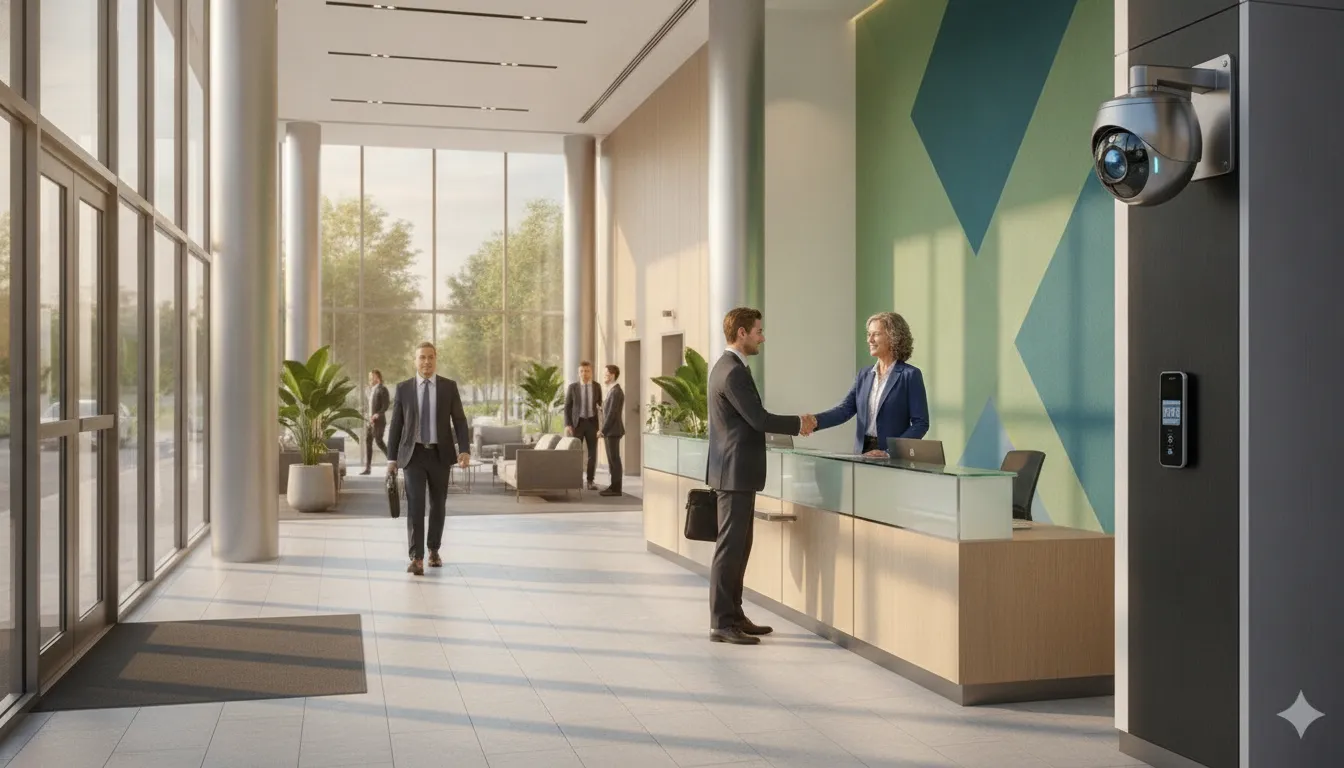
A visitor arriving at a commercial property should not have to rely on a paper log, a hurried phone call, or an employee noticing someone in the lobby. Property managers need a process that welcomes expected guests while giving staff a clear view of who is on site, where they should go, and when they leave.
A visitor management system for commercial buildings organizes arrival, registration, credential issuance, host notification, and check-out in one workflow. Depending on the building and system selected, it may also support pre-registration, photo ID checks, visitor passes, reporting, and emergency accountability.
Request a free on-site security assessment
The right approach depends on more than the software. Office tenants, residential occupants, delivery traffic, shared amenities, entry points, staffing, and existing access control all shape how visitors should move through the property. Start by understanding what the system does and how its workflow can fit your building.
What Is a Visitor Management System for Commercial Buildings?
A visitor management system for commercial buildings is a set of software, procedures. And entry tools that helps a property identify, approve, credential, and track guests from arrival through departure. Depending on the product and building, it may support online registration, a reception desk, self-service sign-in, badge printing, host notifications, access-control integration, and visitor records. No two systems include the same features, so the workflow should be designed around the facility rather than selected from a generic feature list.
In practical terms, the system creates a consistent record of who is expected, who arrived, where that person is permitted to go, and whether the visit has ended. NIST provides a useful example of a controlled process: adult visitors must be pre-registered, present accepted photo identification, complete required screening, and obtain a visitor pass. These requirements are specific to NIST, but they illustrate the basic principles of planned arrival and authenticated entry. NIST campus access and security guidance explains that process.
How the visitor workflow works
- Pre-registration: An employee, tenant, or property staff member records the guest, visit date, host, and other required details. Some systems allow the host to pre-approve the visit and send instructions before arrival. A University of California Office of the President example uses a browser-based application to pre-register and pre-approve expected visitors.
- Arrival: The guest enters through the designated lobby, security desk, or another controlled entrance. Clear instructions can reduce confusion for first-time visitors without bypassing the building’s security procedures.
- Identity check: Staff or the system confirms the visitor’s information and, where policy requires it, checks photo identification or other credentials. Screening requirements should reflect the property’s risk profile and applicable privacy policies.
- Host notification: The employee or tenant receives an alert that the visitor has arrived. If the host cannot confirm the visit, staff can hold the visitor at the approved meeting point while the access decision is reviewed.
- Temporary credential: The visitor may receive a printed badge, temporary card, fob, mobile credential, or another visible identifier. Some systems can connect that credential to defined doors or time windows, while others only document the issuance.
- Access decision: Staff or an integrated access-control system determines whether the visitor may proceed, which areas are appropriate, and whether an escort is required. The decision should account for tenant boundaries, restricted rooms, deliveries, contractors, and after-hours visits.
- Check-out and records: At departure, the visitor is checked out and the credential is returned or deactivated when applicable. The resulting record can help property teams review occupancy, investigate incidents, and account for people during an emergency.
The right configuration depends on lobby layout, tenant mix, staffing, entry points, and existing security equipment. A professional assessment can show where visitor management should connect with access control, cameras, intercoms, and building procedures.
Why Property Managers Need More Than a Sign-In Sheet
A paper sign-in sheet records that someone wrote a name at the desk. It does not reliably show whether the visitor was expected, which employee or tenant accepted responsibility. Whether the visitor received the right credential, or whether the person checked out. For a property manager, that leaves important parts of the arrival process dependent on memory, handwriting, and manual follow-up.
A digital visitor workflow creates a clearer operating record. Depending on the system and the building’s policies, visitors can be preregistered, checked in. Issued a badge or other temporary credential, connected with a host, and checked out when they leave. Hosts can receive notifications without requiring the receptionist to make repeated calls. These steps make the lobby experience more consistent while giving staff a practical way to see who is expected and who is currently on site.
Identity checks also become easier to apply consistently. A property manager can define when visitors should present identification, where they may go, and how long a temporary credential remains valid. The goal is not to make every arrival feel like a security screening checkpoint. It is to establish a repeatable process that matches the building’s use, tenant expectations, and access policies. Federal facility access guidance addresses access control as a complete process, from employee and visitor entry through screening and the first authentication point for nonpublic space. CISA facility access guidance provides a useful framework for thinking through those stages.
Digital records can support accountability after an event or operational question. Instead of searching through pages of handwriting, authorized staff may be able to review arrival details, host notifications, credentials, and departure records in one place. Some platforms also offer reporting, incident records, or emergency accountability tools. These are capabilities to evaluate during system selection, not automatic outcomes of every product.
Mixed-use properties make this distinction especially important. An office tenant may expect scheduled guests to move efficiently from the lobby to a meeting room. A residential or retail area may have different hours, entrances, and host responsibilities. A loading area may handle vendors and deliveries rather than traditional guests. One paper log rarely reflects those differences. A properly planned commercial access control system can connect visitor procedures with the building’s entry points, staffing model, and existing security technology. The result is a more welcoming arrival process with better visibility and fewer manual gaps for the people responsible for daily operations.
How Visitor Workflows Differ by Building Type
A visitor management system for commercial buildings should follow the way a property actually operates. The right workflow for a staffed office lobby may be inefficient at a warehouse. While a process designed for a distribution center may create unnecessary friction for a multi-tenant property. Start by mapping who arrives, who receives them, which entrance they use, and what information the property needs after they leave.
The table below shows the operational differences property managers should account for during planning.
| Building type | Common visitors and hosts | Entry and credential workflow | Records and operational priorities |
|---|---|---|---|
| Office building | Clients, candidates, vendors, interview guests, and meeting attendees visiting employees or departments. | Visitors can be pre-registered by a host, check in at a reception desk or kiosk, receive a temporary badge, and wait for host notification before entering controlled areas. | Track arrival and departure, host, destination, badge status, and recurring appointments. The process should keep the lobby moving while giving reception and security a clear view of expected guests. |
| Multi-tenant property | Guests, contractors, delivery personnel, and prospects visiting different tenant companies, each with separate contacts and policies. | Route the visitor to the correct tenant or suite. Depending on the layout, a front desk, directory, intercom, or cloud-based phone entry system may support confirmation before a temporary credential is issued. | Separate tenant records and permissions without losing building-wide visibility. This is broader than resident access or phone-entry concerns covered in an apartment visitor entry systems guide, because commercial properties must also account for business guests, vendors, and tenant-specific policies. |
| Mixed-use facility | Office workers, residents, retail customers, service providers, event guests, and visitors to shared amenities. | Use different rules for public, tenant, residential, loading, and after-hours entrances. Temporary badges, mobile credentials, escorted access, or host approval may apply based on the destination and time. | Keep visitor categories and access zones distinct. Records should help management understand which entrance was used, which area was authorized, and whether a credential was returned or deactivated. |
| Industrial or logistics site | Drivers, carriers, contractors, inspectors, suppliers, employees from other locations, and customers collecting or delivering goods. | Separate pedestrian and vehicle arrival where possible. Confirm the host or dock contact, apply site-specific screening rules, issue a time-limited credential or visitor pass, and direct the person to the approved area. | Capture company, purpose, host, arrival time, departure time, vehicle or shipment reference when required by site policy, and access zone. Integration with cameras and access control can improve visibility across remote entrances, yards, docks, and offices. |
These workflows can share a common platform while using different rules for each building, tenant, entrance, and visitor category. An on-site assessment should consider lobby layout, staffing, delivery traffic, existing wiring, cameras, and access points before hardware or software is selected. That planning approach helps create a visitor process that is consistent for guests but appropriately specific to the property.
Which Features Should a Commercial Visitor System Include?
A useful visitor system should fit the way people actually enter and move through your building. Evaluate the following capabilities as requirements to discuss with an integrator, not as a checklist that every property must implement in the same way.
Registration, identity, and arrival workflows
Look for online pre-registration and scheduling so employees or tenants can provide visitor details before arrival. The workflow should support clear policy checks, host approval, and instructions for guests. NIST’s campus access guidance, for example, requires adult visitors to be pre-registered, present accepted photo identification, and obtain a visitor pass. Those rules may not apply to your property, but they demonstrate how registration, identity verification, screening, and credentials can work together.
At the desk or entry point, consider self-service sign-in, assisted check-in, or both. A kiosk can help during busy periods, while staff support may be more appropriate for deliveries, contractors, or visitors who need an accommodation. UCOP describes a browser-based process for pre-registering and pre-approving guests, followed by photo ID verification and a printed badge at the security desk. NIST’s visitor access guidance and the UCOP visitor management example provide useful reference points.
Notifications, credentials, and records
- Host notifications: Confirm that the system can alert the appropriate employee or tenant when a guest arrives, and provide a clear fallback when the host is unavailable.
- Badges or temporary credentials: Ask whether it can print visible badges or issue time-limited credentials, with permissions matched to the visitor’s destination and visit window.
- Visitor and delivery records: The system should record arrivals, departures, hosts, visit purpose, and relevant delivery or contractor details in a way authorized staff can retrieve.
- Reporting: Review filtering, export, audit history, and retention controls. Reports should help managers understand traffic and confirm that procedures were followed.
Safety, privacy, and administrative controls
Ask how staff can document an incident, attach relevant notes or photos, escalate a concern, and close the record. Emergency accountability is equally important. During an evacuation or other disruption, authorized personnel may need a current list of visitors and contractors. Along with a process for emergency messaging and reconciliation at assembly areas.
Accessibility and privacy should be evaluated before deployment. Check for accessible kiosk placement, readable instructions, alternative check-in methods, language needs, and a policy for collecting, storing, sharing, and deleting visitor information. Finally, review role-based permissions, administrator approval, device security, backups, and system availability. A strong commercial access control system and visitor workflow should reinforce one another without giving every user unrestricted access to sensitive records.
How Does Visitor Management Integrate With Access Control and Cameras?
A visitor workflow is most useful when it connects the front desk, entry points, and security team instead of operating as an isolated sign-in tool. An integrated visitor management system for commercial buildings can pass approved visitor information into the building’s established security process while leaving the final configuration to the site’s equipment. Policies, and network design. Federal facility guidance describes access control as a process that extends from employee and visitor entry through screening and authentication into nonpublic space. CISA facility access guidance provides useful context for planning that process.
Connect registration to the right entry decision
Consider a tenant’s guest arriving for a scheduled meeting. The host or visitor registers in advance, or the guest completes an approved check-in process at the lobby. Staff can review the visit, confirm the destination, and issue a temporary credential or badge when the workflow calls for one. A connected access-control system can then apply the appropriate permission to a card, fob, mobile credential, or other approved method. The permission should be limited to the doors and time period that fit the visit, rather than granting broad building access by default.
In a multi-tenant property, phone entry or a video intercom may provide the communication step. The visitor selects a tenant or destination, and the tenant or authorized staff member verifies the request before releasing the entrance. Review the options described in this phone entry systems guide for multi-tenant buildings and the commercial intercom entry systems guide as part of the larger workflow, not as a substitute for visitor policy.
Use cameras for context and accountability
Cameras add visual context to an access event. When a visitor checks in, receives a credential, or approaches a controlled door, camera coverage can help authorized personnel understand what occurred at the entrance. The exact association between visitor records, door events, and video timestamps depends on the selected products and configuration, so it should be confirmed during design. Even without a direct software connection, placing cameras to cover the lobby, reception area, and controlled doors improves review and situational awareness. Explore commercial security camera systems for planning considerations.
Choose cloud, on-premise, or hybrid around operations
Access control may be deployed in the cloud or on premises. IP camera systems may also use cloud-based, on-premise, or hybrid storage, subject to the site’s network, retention, privacy, and support requirements. Cloud tools can help authorized teams manage information across locations, while on-premise systems may fit facilities with specific infrastructure or data policies. An on-site assessment should map existing cameras, wiring, network capacity, entry hardware, staffing, and monitoring needs before anyone promises a particular integration. A qualified integrator can then document the event flow, test it with staff, and provide training and ongoing support.
How to Plan and Implement a Visitor Management System
A successful implementation starts with the building, not the software. A property manager needs to understand how people, deliveries, tenants, employees. And contractors actually move through the property before choosing a kiosk, badge printer, credential type, or cloud platform. An on-site assessment can identify lobby constraints, secondary entrances, loading areas, accessibility needs, existing wiring, camera views, staffing patterns, and points where visitors could bypass the intended process. It also helps align the visitor workflow with the broader access-control process, from entry and screening to authentication into nonpublic areas, as described in CISA facility access guidance.
- Assess the site and current policies. Walk every public and service entrance. Document reception coverage, tenant access hours, delivery procedures, emergency routes, visitor parking, and areas that require escorting. Review current sign-in, identification, badge, privacy, and incident procedures. The goal is to find the gaps between written policy and daily operations.
- Map visitor types and entry points. Separate employees, tenant guests, vendors, contractors, delivery drivers, interview candidates, and recurring visitors. For each group, define where they arrive, who approves access, what information staff need, and whether they receive a temporary credential. A multi-tenant office may need host notifications, while an industrial property may need a distinct process for truck traffic and restricted production areas.
- Select the deployment and integrations. Compare cloud, on-premise, or hybrid requirements with the building’s network, privacy expectations, staffing model, and support resources. Identify which workflows should connect to commercial access control systems, cameras, intercoms, directories, or notification tools. Confirm what happens if an integration or network connection is unavailable.
- Define credentials, data, and retention rules. Decide whether visitors receive printed badges, mobile credentials, or another temporary authorization. Establish who can view visitor records, who can change permissions, how hosts are notified, and when credentials expire. Set retention and deletion rules with legal, privacy, and tenant requirements in mind. Document exceptions instead of leaving them to front-desk judgment.
- Pilot and test the workflow. Use representative scenarios, including a preregistered guest, an unscheduled visitor, a contractor, a delivery, a host who does not respond, and an after-hours arrival. Test check-in, identity verification, badge issuance, notifications, access permissions, check-out, reporting, and failure recovery. Include emergency accountability and confirm that staff can find the information they need without creating a second manual log.
- Train staff and tenants. Give reception, security, property management, and tenant contacts role-specific instructions. Explain how to pre-register guests, approve exceptions, report incidents, recover from errors, and protect visitor information. Provide tenants with a simple process for notifying hosts and preparing expected visitors. Training should reflect the actual building layout and escalation path.
- Review performance and maintain support. After launch, review rejected entries, recurring exceptions, visitor volume patterns, tenant feedback, and incidents. Adjust workflows when occupancy, tenant mix, staffing, or entry conditions change. Keep credentials, integrations, cameras, and policies aligned through documented support and periodic site reviews.
Frequently Asked Questions
Can a visitor management system work in a multi-tenant building?
Yes. The workflow can be configured for multiple tenants, shared entrances, tenant-specific hosts, and different access permissions. Visitors may be preregistered, notified on arrival, issued temporary credentials, and checked out without giving every tenant the same level of control.
Does visitor management replace access control?
Usually, it complements access control rather than replacing it. Visitor management handles the registration and credential workflow, while access control determines which doors or areas a credential can open. Connecting the two can help property staff apply visitor permissions consistently.
What should visitors receive after checking in?
Depending on the building’s policy, visitors may receive a printed badge, temporary card, fob, mobile credential, or other defined pass. Identity checks and screening requirements should be set by the facility’s risk profile and operating policies. NIST, for example, requires visitor preregistration, accepted photo identification, and a visitor pass for covered adult visitors: NIST campus access guidance.
Can the system help during an emergency?
It can provide a current record of checked-in visitors and support emergency messaging or evacuation accountability when those capabilities are included and configured. Property managers should decide who can access the information, how often records are reviewed, and how the process works if the network or primary check-in device is unavailable.
Talk With a Security Integration Team
A visitor process is only as dependable as the building design behind it. Entry points, tenant schedules, delivery routes, existing wiring, camera views, and access policies all affect how the system should work. A site assessment helps turn those details into a practical plan.
InVision Systems designs and installs customized security solutions for commercial, industrial, and residential clients across the Chicago area and the broader Midwest. The team can help you evaluate visitor workflows alongside access control, phone entry, cameras, and ongoing support.