
PoE Security Cameras for Business: A Practical Guide
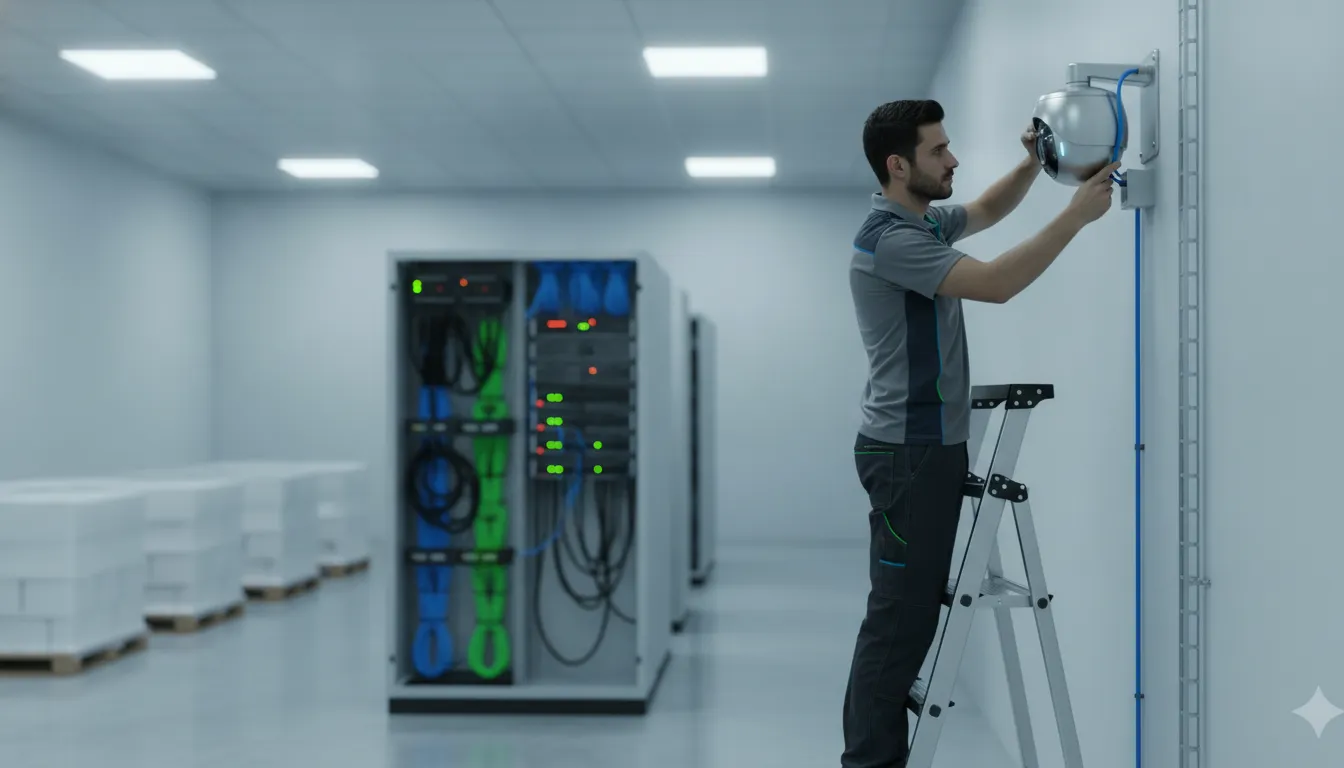
PoE Security Cameras for Business: A Practical Guide
For a business security system, the camera is only one part of the decision. The network must also deliver dependable power, carry high-resolution video, and remain manageable as coverage expands across offices, warehouses, parking areas, or production space.
Request your free security assessment now
PoE security cameras for business use one Ethernet cable to receive electrical power and transmit video data to a PoE network switch, which connects the cameras with an NVR or video management system. This hardwired design can simplify installation, support centralized monitoring, and make future expansion more predictable.
The right result still depends on cable type, run length, switch capacity, bandwidth headroom, and the property itself. Wireless or coax can be sensible in specific conditions, but each option involves different reliability and maintenance tradeoffs. First, it helps to understand what happens between the camera, the switch, and the recording system.
How Do PoE Security Cameras for Business Deliver Power and Data?
PoE security cameras for business use one Ethernet cable to carry two essential connections at once: electrical power for the camera and network data for the video stream. That shared path reduces the amount of cabling required at each camera location and creates a more organized installation for offices, warehouses, retail facilities, and other commercial properties.
The process begins at the network side. A PoE-enabled switch, or a compatible injector, acts as the power-sourcing equipment. It connects the camera to the network while supplying power through the Ethernet cable. The camera receives that connection as a powered device and sends its video data back across the same cable. This is the practical meaning of a one-cable architecture: one run from the camera location to the network equipment can support both operation and communication.
There is also a safety check before power is applied. The IEEE 802.3af detection protocol distinguishes a compatible powered device from a non-compatible device. This helps prevent power from being sent to equipment that is not designed to receive it. More broadly, the IEEE 802.3 working group develops Ethernet standards, including standards for Power over Ethernet. These standards support interoperability between compatible cameras and network equipment.
Where does the video go?
After the camera connects to the switch, its video can travel to a Network Video Recorder (NVR) on the local network. The NVR stores and manages recorded footage, while authorized users can view live or recorded video through the system. In a system built around video management software (VMS), the switch forwards the camera stream to the VMS platform instead. The underlying camera connection remains the same, but the software determines how video is viewed, recorded, searched, and managed.
This arrangement simplifies commercial deployments in several practical ways:
- Fewer cable runs: Each camera generally needs one Ethernet connection instead of separate power and video wiring.
- Centralized infrastructure: Cameras connect back to network equipment in a planned location, making system administration more consistent.
- Cleaner expansion planning: Additional cameras can use available PoE switch ports when the network design provides suitable capacity.
- Easier service coordination: Power and data follow the same documented path, which helps technicians trace connections during maintenance.
The result is not simply a convenient installation method. It is a structured camera infrastructure that connects field devices to recording or management software through the business network. Proper design still matters, including selecting compatible equipment and planning cable routes, but PoE gives commercial teams a clear foundation for reliable, organized surveillance.
What Equipment Does a Business PoE Camera System Need?
A dependable commercial PoE camera system typically includes IP cameras, a PoE-enabled network switch or injector, Ethernet cabling, and an NVR or VMS. Businesses may also need managed switching, rack or cabinet space, network segmentation, storage sized for retention goals, and UPS protection for critical equipment.
Core video and network equipment
Start with IP cameras positioned for the risks you need to monitor. Exterior entrances, loading areas, parking lots, production spaces, and interior corridors may call for different camera designs, lenses, and mounting locations. The camera choice should follow the coverage plan rather than the other way around.
A PoE switch supplies power and network connectivity to the cameras through Ethernet cabling. A basic installation may use an appropriately sized switch, while a larger site may benefit from managed switching for better visibility and administration. Confirm the switch has enough ports and sufficient power capacity for every connected camera, including planned additions.
Video then needs a recording and management destination. This may be a network video recorder (NVR), which stores and organizes footage locally. Or a video management system (VMS), which provides software-based administration across one or more locations. The right choice depends on retention needs, the number of cameras, remote viewing requirements, and how the business manages its network.
Cabling, mounting, and power protection
Cat5e and Cat6 Ethernet cables are common choices for PoE camera runs. Cat6 can support higher bandwidth and distance performance. Which may make it a practical choice for high-resolution cameras or installations where the infrastructure is intended to remain useful through future upgrades. Cable paths should be planned around distance, building construction, access points, and protection from physical damage.
For a clean commercial deployment, network equipment is typically organized in a rack or secured cabinet. The rack should provide orderly patching, ventilation, service access, and room for the switch, recorder, and related network hardware. A UPS can provide short-term power protection for the network and recording equipment during interruptions or brief disturbances. It does not replace a broader business continuity plan, but it can help keep critical equipment from dropping offline unexpectedly.
Professional planning matters because an incorrectly routed cable or undersized switch can affect an otherwise capable camera system. Businesses opening or remodeling a facility should coordinate camera pathways with their broader structured cabling for a new business. This approach helps keep the surveillance network serviceable, documented, and ready for future changes.
How Should You Plan Cable Runs, Bandwidth, and Reliability?
Plan each camera route to the network rack before installation. Account for cable length, building access, outdoor exposure, bandwidth, switch power, storage, future cameras, network segmentation, and backup power. This sequence helps a business avoid undersized infrastructure, simplify maintenance, and preserve dependable coverage as the property changes.
Select cabling with room to grow
Cat5e and Cat6 Ethernet cable are common choices for PoE deployments. Cat6 can support higher bandwidth and distance performance, making it a practical choice when the design includes high-resolution cameras, longer routes, or future expansion. Cable quality, termination, labeling, and installation technique all matter. A poorly terminated connector or cable routed alongside a source of interference can undermine an otherwise capable camera and switch.
Do not design around the minimum bandwidth requirement. Estimate the combined traffic from every camera, then leave headroom for higher frame rates, higher resolution, additional views, and normal business network activity. The same principle applies to the switch. Confirm that the switch has enough available ports and sufficient total PoE power capacity for the connected devices. A port may be available while the switch’s overall power budget is already constrained.
Use network controls and maintenance practices
Where appropriate, place cameras on a dedicated VLAN, or virtual network segment, rather than treating them like ordinary office endpoints. Restrict who can reach camera administration interfaces, use strong unique credentials, and limit remote access to secure methods. CISA recommends minimizing network exposure for control-system devices and isolating remote devices from business networks when possible. See its guidance at CISA’s network exposure recommendations.
Firmware planning is part of reliability as well as cybersecurity. Network-connected cameras can contain vulnerabilities that create risks such as unauthorized access or remote code execution. NIST’s record for a UniFi Protect Cameras vulnerability illustrates why teams should track firmware versions, review vendor advisories, and apply updates through a controlled process: NIST National Vulnerability Database guidance.
Managed PoE switches add useful operational visibility. They can prioritize camera traffic and remotely power-cycle an individual camera when a device needs recovery. Still, reliability does not come from PoE alone. Use monitoring, documented labeling, scheduled maintenance, and a UPS for network equipment and recording hardware. Power resilience should also account for the electrical circuit and any critical network links, so a brief outage does not immediately remove visibility. A system designed this way is easier to support, safer to manage, and better prepared for the demands of a growing business.
Are PoE Security Cameras Scalable for a Growing Business?
Growth rarely happens in a perfectly predictable pattern. A business may add a loading area, expand a warehouse, open another entrance, or move into a larger facility. A PoE camera system can accommodate those changes without requiring a complete replacement, provided the original network is designed with expansion in mind.
The simplest expansion pattern is connecting a new camera to an available port on an existing PoE switch. The switch supplies power and carries the camera’s video traffic across the network, while the recorder or video management platform adds the camera to the monitoring environment. This approach can make phased installations practical, but an unused port alone does not guarantee capacity. The switch also needs enough power budget, and the network needs sufficient bandwidth for the added video streams.
During initial planning, it is wise to reserve switch ports for likely additions instead of filling every connection on day one. Design teams should also allow room in the equipment rack, confirm that cable pathways can reach future camera locations, and consider whether higher-resolution cameras will increase bandwidth requirements. These decisions are particularly important in facilities where walls, ceilings, production areas, or stored inventory may change over time.
- Reserve spare PoE ports and power capacity for planned additions.
- Leave bandwidth headroom for additional or higher-resolution cameras.
- Document cable routes, switch locations, camera names, and network settings.
- Plan separate connectivity and access controls when sites or departments expand.
Scaling across multiple locations
Multi-site growth requires more than adding cameras to a single switch. Each location should be evaluated for its own camera count, uplink capacity, recording approach, internet dependency, and remote-access requirements. A consistent naming and documentation standard helps operators find the correct camera quickly, while secure network segmentation can reduce unnecessary exposure between surveillance equipment and everyday business systems.
Managed PoE switches provide useful visibility as the system grows. They can help administrators review port status, monitor power use, prioritize camera traffic, and remotely power-cycle an individual camera when appropriate. Those controls can reduce troubleshooting time, especially when a facility has cameras in difficult-to-reach areas. NIST guidance also underscores why network-connected devices require deliberate security planning, including controlled access and appropriate maintenance.
Long-term maintenance should include firmware review, cable and connector inspections, storage-capacity checks, and periodic confirmation that every camera still covers the intended area. For a growing facility, commercial security camera systems should be treated as an evolving infrastructure project, not a one-time equipment purchase.
When Are Wireless or Coax Cameras Better Than PoE?
PoE is often the strongest foundation for a business surveillance system, but it is not the only sound choice. The right infrastructure depends on the building, cable pathways, network design, coverage goals, and how consistently each camera must remain available. Wireless and coax systems can solve specific installation challenges when they are selected deliberately and supported properly.
Wireless cameras can fit locations where running Ethernet is not feasible. Examples include detached structures, difficult-to-access areas, historic buildings, or spaces where new cable pathways would disrupt operations. They still require dependable power and a carefully planned wireless connection. Walls, equipment, distance, interference, and network congestion can affect performance, so a wireless survey should be part of the design rather than an afterthought. Customer guidance identifies wireless as a practical option where cable installation is difficult, while hardwired PoE is generally more consistent for high-uptime surveillance.
| Infrastructure | Best fit | Primary consideration |
|---|---|---|
| PoE/IP | New construction, major renovations, and sites requiring dependable uptime and straightforward expansion | Requires planned Ethernet cabling, switch capacity, and network security controls |
| Wireless | Areas where cable installation is impractical or physically difficult | Requires strong coverage, reliable power, and protection from interference or signal loss |
| Coax or HD-TVI | Facilities with usable existing coax infrastructure and a need to modernize cameras without replacing every run | Requires an assessment of cable condition, distance, connectors, recording equipment, and future expansion |
| Hybrid | Properties with mixed building conditions, legacy equipment, or phased upgrades | Needs a unified plan for recording, user access, maintenance, and consistent evidence quality |
Coax or HD-TVI can be practical when a property already has suitable coax runs. Reusing that infrastructure may reduce disruption during an upgrade, especially across an occupied commercial or industrial site. However, the existing cable should be tested rather than assumed to be adequate. Connectors, power distribution, recording compatibility, and the ability to add future cameras all affect the result.
InVision Systems supports IP, wireless, HD-TVI, analog, and hybrid camera options. That range allows the system to be matched to the property instead of forcing every building into one technology. The decision should also account for the required security camera resolution and image detail, lighting, viewing distance, and the quality of evidence needed for investigations. For many businesses, PoE security cameras for business remain the most consistent choice for high-uptime coverage. While wireless or coax can be the better answer in clearly defined areas where their strengths outweigh their tradeoffs.
How Can a Business Choose the Right Camera Infrastructure?
The right infrastructure starts with the property, not with a particular camera model. A retail storefront, manufacturing floor, office campus, and distribution center can have very different lighting, ceiling heights, traffic patterns, and exposure points. A sound design connects those conditions to dependable coverage, manageable storage, and a practical maintenance plan.
For businesses evaluating PoE systems for commercial applications, the goal is to build a system that supports current operations without creating avoidable limits during expansion. Use this planning sequence before selecting equipment:
- Map the property and its risks. Mark entrances, exits, loading areas, inventory zones, cash-handling points, parking areas, restricted rooms, and other vulnerability points. Note ceiling height, exterior exposure, lighting changes, obstructions, and the viewing angles needed at each location. A warehouse may require long aisle views and loading dock coverage, while a commercial office may prioritize doors, reception areas, and shared access points.
- Define what each camera must show. Decide whether the objective is general activity awareness, identification, process verification, or evidence after an incident. That decision influences lens selection, placement, resolution, low-light performance, and retention needs. InVision’s commercial security camera planning guide provides additional context for matching system design to a business property.
- Plan the pathways and power. Identify practical cable routes from each camera to the network rack or equipment location. PoE can carry power and data over one Ethernet cable, but the design still needs suitable cable, switch locations, termination, weather protection, and service access. Professional structured cabling can reduce exposed runs and simplify future changes.
- Size the network, storage, and resilience. Account for the number of cameras, resolution, frame rate, recording schedule, remote viewing, and retention period. Confirm that switches have adequate ports and power capacity, then plan network segmentation, user access, equipment ventilation, backup power, and alerts for failed devices. Managed equipment can make troubleshooting and maintenance more controlled.
- Choose the connection method and support plan. PoE is often a strong fit where consistent uptime, centralized management, and straightforward expansion matter. Wireless may be appropriate where cabling is impractical, provided signal strength and interference are evaluated. Coax or a hybrid design can make sense when existing infrastructure remains useful. Large facilities can benefit from a dedicated warehouse security camera planning approach. Final selection should reflect the building, operating environment, and long-term support requirements.
InVision Systems designs professional-grade security installations around the site’s actual conditions, including lighting, height, coverage objectives, and vulnerability points. That consultative approach helps commercial and industrial buyers select infrastructure that is reliable today and adaptable as the property changes.
Frequently Asked Questions
What are the main benefits of PoE cameras for a business?
PoE cameras carry power and video data through one Ethernet cable, which can simplify installation and reduce the amount of separate power infrastructure near each camera. A properly designed system also makes it easier to centralize recording, manage devices, and expand coverage as the facility changes.
What equipment is needed to power PoE cameras?
Each camera needs a compatible PoE-enabled network switch or a suitable PoE injector, plus the correct Ethernet cabling. Most business systems also use a network video recorder or video management software, dependable network equipment, and backup power where continued surveillance matters during an electrical interruption.
How far can a PoE camera be from its network switch?
Distance depends on the cable type, camera power requirements, network design, and environmental conditions. Longer routes may require a properly selected extender, an additional switch, or a different infrastructure plan. A professional survey should account for the actual path, not just the straight-line distance between devices.
Are PoE cameras more reliable than wireless cameras?
For locations where consistent connectivity and uptime are priorities, hardwired PoE usually provides a more predictable connection than wireless. Wireless can still be practical where cabling is difficult or disruptive, but the design must account for signal strength, interference, network security, and dependable power at the camera.
Can a business reuse its existing network cabling?
Often, yes, if the existing Ethernet cabling is in good condition, correctly terminated, and suitable for the cameras’ data and power requirements. Testing the cable runs before installation is important. Older coax infrastructure may also remain useful for a hybrid or HD-over-coax upgrade when replacing every cable is impractical.
Plan a Reliable Business Camera System
PoE can give a business a clean foundation for dependable video, but the best result depends on more than choosing cameras. Cable routes, switch capacity, storage, lighting, mounting height, network security, and future expansion all affect what the system can deliver.
InVision Systems designs and installs customized security camera systems for commercial and industrial properties throughout the Chicago area and surrounding markets. The team can help you evaluate whether PoE, wireless, coax, or a hybrid approach fits your building and operating goals.
Request your free security assessment today
Share your property type, current cabling, coverage concerns, and plans for growth through the contact form. You will receive guidance based on the site, not a one-size-fits-all equipment list.