
Integrated Security Systems for Businesses Guide
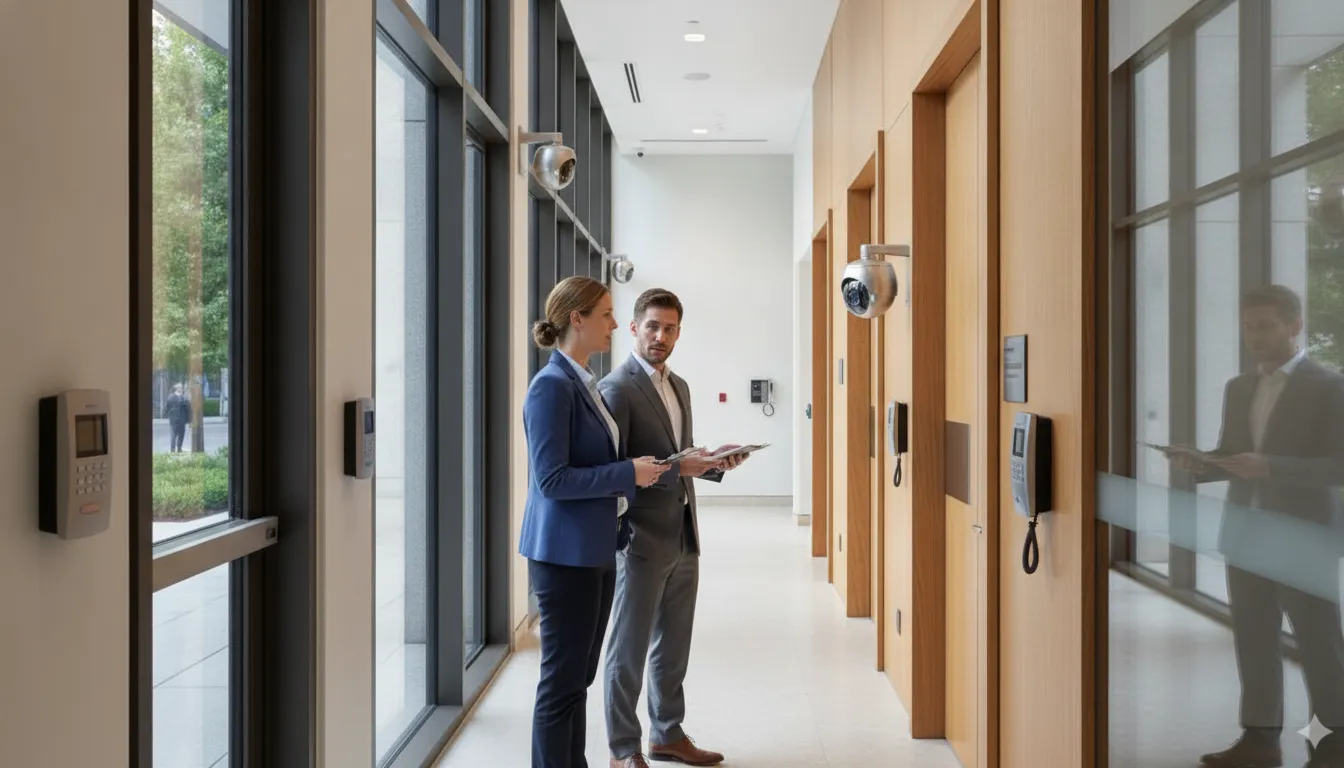
A camera can show what happened, but a camera alone may not control a door, alert the right people, or guide a visitor. Businesses get stronger coverage when their security tools work as one coordinated system rather than as isolated devices.
Integrated security systems for businesses connect security cameras, burglar alarms, access control, intercoms, and cloud services in one coordinated plan. When these components are designed to work together, authorized teams can relate access events to video, verify alarms, manage visitors, and respond consistently across a commercial or industrial property. Explore commercial security systems.
In practice, an access event can be evaluated alongside video, and an alarm can prompt verification. An intercom can help staff communicate with an authorized visitor before granting entry. Cloud services can add centralized visibility for facilities and locations. Existing cameras may be incorporated through a hybrid platform that supports phased upgrades. The right design depends on the building, its layout, lighting, operating routines, people, and vulnerability points, not on a standard equipment bundle.
NIST recommends addressing stakeholder requirements and protection needs early and throughout a system’s life cycle. That same practical discipline helps a commercial or industrial organization choose where technology adds value, how teams should respond, and what support the system will need over time. InVision Systems combines consultation, custom design, installation, monitoring, maintenance, and support to help businesses build that strategy.
Request a customized security assessment
Before selecting individual devices, it helps to understand the architecture that turns separate security functions into a coordinated business safeguard.
What Are Integrated Security Systems for Businesses?
Integrated security systems for businesses connect separate security tools so they support a shared operating plan. Cameras, burglar alarms, access control, phone entry, cloud services, and monitoring can exchange relevant events, alerts, and context through coordinated workflows. The goal is not to force every business into the same equipment package. It is to make the right components work together around the building’s actual risks and daily operations.
For example, an access event can be considered alongside nearby video, while an alarm can direct attention to a specific area instead of creating an isolated notification. A manager may also review activity across multiple locations from a single device, depending on the selected platform and configuration. This shared visibility reduces the need to monitor disconnected systems separately.
The boundary of integration is coordination. A business may keep useful existing equipment, add newer technology in priority areas, and create consistent response procedures without replacing everything at once. Hybrid camera platforms, for instance, can combine HD, analog, and IP cameras through one software interface and support phased upgrades. Learn more about commercial security camera systems when video is a central part of the plan.
Integration starts with business requirements
A sound design begins with stakeholder requirements and protection needs, not a list of products. NIST explains that security requirements should be addressed early and throughout a system’s life cycle, while a defensible infrastructure may include products, systems, and services working together. Its systems security engineering guidance frames this as an engineering-driven activity rather than a simple equipment purchase: NIST SP 800-160.
That means the design should account for lighting, ceiling height, coverage needs, entry points, sensitive areas, staffing, and known vulnerability points. A warehouse, hotel, dealership, or manufacturing plant may need a different combination of video, alarms, controlled entry, visitor communication, and remote oversight. InVision Systems uses consultation and custom design to match those conditions, then supports installation, monitoring, maintenance, and ongoing system changes.
Component-specific guides can explain what cameras, alarms, or access control do individually. An integrated approach addresses the relationship between them: who receives an event, what information they can review, which permissions apply, and what response follows. That connection is what turns a collection of security devices into a coordinated business security strategy.
What Does Each Security Component Do?
An integrated system works best when each component has a defined job and shares useful information with the others. Cameras show what is happening. Alarms identify events that need attention. Access control manages who can enter specific areas. Intercoms help staff communicate with visitors. Cloud services bring visibility and administration together. Structured wiring provides the dependable infrastructure that connects devices throughout the property.
These layers can support a hotel, dealership, retail location, warehouse, manufacturing plant, or distribution center. The right combination depends on the building layout, lighting, ceiling height, operating hours, entry points, and vulnerability areas. A business does not necessarily need to replace every existing device. Hybrid camera platforms, for example, can combine HD, analog, and IP cameras through one software interface, allowing upgrades to occur in phases.
| Component | Role | Useful business signal or action |
|---|---|---|
| Cameras | Provide visual coverage, recording, and operational awareness. | Review a door, loading area, parking lot, or restricted zone when an event occurs. IP cameras may also support line-crossing, intrusion, people-counting, night-vision, and remote-viewing features. |
| Burglar alarms | Generate alerts when protected areas or devices indicate a possible intrusion. | Pair an alarm event with nearby video and access records to help staff verify what requires attention. |
| Access control | Manage authorized entry through key cards or fobs, using cloud-based or on-premise administration. | Review access activity, limit entry by area, and update permissions as employees, contractors, or schedules change. |
| Intercom and phone entry | Support controlled entry and two-way visitor communication, including multi-tenant environments. | Confirm a visitor’s purpose before releasing a door. Learn more about commercial intercom systems. |
| Cloud services | Centralize viewing, administration, and information from connected security tools. | Monitor multiple locations from a single device and access camera systems through web-based devices. See this guide to cloud video surveillance for business. |
| Structured wiring | Carry data and power between cameras, access devices, intercoms, and network equipment. | Plan cable routes and network capacity around the building’s future security needs. Explore structured cabling infrastructure for more context. |
The value comes from coordination rather than from any single device. An access event can provide context for a camera view. An alarm can direct attention to a specific zone. Cloud access can help an authorized manager review activity across locations. The system should turn those separate signals into a practical workflow, with permissions and response responsibilities defined during design.
How Do Cameras, Alarms, and Access Control Work Together?
An integrated security workflow connects what happens at an entry point with what people can see, verify, and act on. The goal is not to make an unrealistic promise that technology eliminates crime. It is to give authorized staff a clearer sequence for evaluating an event and documenting the response.
1. An access event or alarm starts the workflow
The sequence may begin when an employee uses a key card or fob, a visitor requests entry, or an alarm detects activity in a protected area. Cloud-based or on-premise access control can manage authorized entry, while burglar alarms add another signal when activity does not match the expected conditions. These events provide useful context, such as which door was involved and when the event occurred.
2. Cameras provide visual verification
The system can associate the event with nearby video so a manager or monitoring team can review what is happening instead of relying on an alarm notification alone. Depending on the equipment and configuration, IP cameras may support line-crossing detection, intrusion detection, night vision, remote viewing, and remote configuration. A properly designed system places cameras where they can capture meaningful detail, accounting for lighting, ceiling height, sightlines, and known vulnerability points.
Businesses evaluating commercial security camera systems should consider how each camera will support a specific decision. Such as verifying activity at a restricted door, reviewing a loading area, or confirming whether an alarm requires escalation.
3. Permissions and communication guide the next action
Verification should connect to a defined permission structure. Staff can determine whether the person is authorized, whether the access event matches the schedule, and whether a visitor needs assistance. Phone entry systems can support controlled entry and visitor communication, particularly in multi-tenant settings. Where appropriate, a manager may deny access, contact a responsible person, or direct a monitoring team to follow the site’s response procedure. See the commercial access control systems service page for more on managing authorized entry.
4. The response is documented
A complete workflow records the event, the available video, the decision made, and any follow-up required. This creates accountability for facility managers and helps identify recurring issues, such as an after-hours door opening or a camera angle that needs adjustment. Policies should define who receives alerts, which events require verification, and when to contact emergency services or other designated responders.
Existing properties do not necessarily need to replace every device at once. Hybrid camera platforms can place HD, analog, and IP cameras into one software interface, allowing a business to retain useful infrastructure while upgrading priority areas in phases. That approach can align improvements with site vulnerabilities and operational needs while preserving a coherent workflow.
How Do Cloud Tools and Virtual Guarding Improve Response?
Cloud-connected security tools give authorized teams a clearer view of what is happening across a property without requiring them to be at a dedicated monitoring station. Camera systems can support 24/7 monitoring through web-based devices, allowing a manager to review activity from a computer, tablet, or other approved device. For businesses with more than one facility, multiple locations can be monitored from a single device. That centralized visibility can make it easier to compare events, check a site after an alert, and coordinate follow-up across locations.
This does not mean every event should trigger the same response. A well-designed system connects alerts to operating procedures. For example, an unusual activity notification can prompt an authorized user to review relevant video, confirm whether access was expected, and contact the appropriate person. Camera analytics may help identify activity such as an intrusion or a line crossing, but those functions should support human judgment rather than replace a thoughtful response plan.
Cloud tools can also make access management more practical. Key card and fob systems may be deployed through cloud or on-premise platforms, depending on the business’s requirements. Administrators can use the selected platform to manage authorized entry and maintain appropriate control over permissions. Cloud-based phone entry systems extend that coordination to visitor communication, particularly in multi-tenant properties. A visitor can request entry through the system, and an authorized occupant or manager can communicate before deciding whether to grant access.
Virtual guarding adds another layer when a business needs live oversight. Instead of relying only on an automated alert, live monitoring can bring human intervention into the response workflow. A trained operator may assess camera activity and take a proactive action supported by the system, such as communicating through a speaker. The goal is not to promise that every incident will be prevented. It is to give a business more context and a defined response option when activity requires attention.
For a practical overview, see this guide to cloud video surveillance for business, then review how commercial intercom systems support communication at controlled entry points. Businesses considering live intervention can also learn how virtual security guards work within a broader security strategy.
How Should a Business Plan an Integrated Security System?
A coordinated project starts with the business, not a device list. The goal is to connect protection needs, daily operations, and future changes into a system people can use and maintain. NIST recommends addressing stakeholder requirements early and throughout the system life cycle, a useful principle for planning integrated security systems for businesses.
- Assess stakeholders, operations, and vulnerabilities. Identify who needs access, who responds to alerts, and which areas create the greatest risk or operational concern. Include owners, facility managers, information technology staff, and front-line users where their responsibilities overlap. Walk the property to review entrances, perimeter areas, production spaces, storage, parking, visitor routes, and blind spots. Consider the building’s lighting, ceiling heights, layout, and traffic patterns instead of relying on a standard package.
- Design coverage, permissions, and response rules. Translate the assessment into a coverage plan. Decide where cameras, alarms, access control, intercoms, and monitoring should work together. Define which employees, vendors, tenants, and visitors can enter specific areas, and establish how credentials are issued, changed, and removed. Document who receives an alert, what information they review, and when an issue is escalated. This creates an operational plan, not just an equipment map.
- Review cabling, network capacity, and existing equipment. Inspect power, network paths, recording capacity, and structured cabling infrastructure before selecting new hardware. Existing equipment may remain useful. Hybrid camera platforms can combine HD, analog, and IP cameras through one software interface, allowing a business to use phased upgrades rather than replacing every component at once. A careful review also identifies legacy devices that need adapters, configuration changes, or eventual retirement.
- Install, configure, and test the system. Professional installation should follow the approved coverage and access plan. Configure camera views, recording settings, alert zones, user permissions, alarm contacts, and remote access. Test events under realistic conditions, including low light, unusual traffic, credential changes, network interruptions, and alarm verification. InVision reports that its R&D team tests products and components before deployment, supporting a deliberate approach to system selection and implementation.
- Train users and document accountability. Show authorized users how to view video, respond to alerts, manage credentials, communicate with visitors, and report equipment problems. Provide clear procedures for common events and preserve documentation for administrators and future service teams. Training should match each person’s role rather than giving every user unnecessary permissions.
- Maintain, review, and improve the system. Schedule inspections, software and firmware reviews, credential audits, camera cleaning, alarm tests, and backup checks. Revisit coverage after renovations, staffing changes, new tenants, or process changes. NIST treats requirements as a life-cycle responsibility, so maintenance is part of the original security design. Use the commercial security system maintenance checklist as a practical review resource.
This sequence gives a business a controlled path from assessment to deployment and future improvement. It also leaves room for phased investment as operational priorities become clearer.
Frequently Asked Questions
What are integrated security systems?
Integrated security systems connect tools such as video surveillance, burglar alarms, access control, intercoms, and cloud services so they support one coordinated security strategy. Instead of managing disconnected devices, a business can relate access events, alarm activity, and video evidence through shared software and defined response workflows. The right design depends on the building, operations, vulnerabilities, and protection requirements. It may serve one facility or give authorized users visibility across multiple locations.
Can existing security systems be integrated?
Often, yes. A qualified integrator can evaluate the condition, compatibility, network capacity, and coverage of existing equipment before recommending replacement. Hybrid camera platforms can combine HD, analog, and IP cameras through one software interface, which can support phased upgrades rather than requiring every component to change at once. Existing alarms, cabling, entry hardware, and cameras still need a site-specific review because age, wiring, access permissions, and software compatibility affect the practical integration path.
Can integrated security systems be monitored remotely?
Yes. Camera systems can support remote viewing and 24/7 monitoring from web-based devices, including access to multiple locations from one device. Depending on the design, authorized staff can review video, manage certain settings, receive event information, and oversee access activity without being on site. Cloud-based phone entry can also support controlled visitor communication, while virtual guarding can add live monitoring and human intervention to camera-based detection. Remote access should be governed by clear permissions and response procedures.
How much do integrated security systems for businesses cost?
There is no responsible universal price because each system is designed for its site and operating requirements. Cost depends on the facility’s size and layout, the number and type of cameras, alarms. Access points, monitoring needs, network and structured wiring infrastructure, and the complexity of integrating existing equipment. Multi-location requirements, analytics, storage, user permissions, and ongoing maintenance can also affect scope. A customized assessment should review coverage goals, lighting, ceiling height, vulnerabilities, current components, and future expansion before an integrator prepares a solution and quote.
Schedule a Customized Security Assessment
An integrated approach works best when it reflects your facility, operations, access needs, and existing equipment. A customized assessment can help identify practical ways to connect security tools and establish a clearer response workflow for your business.