
License Plate Recognition Cameras for Business
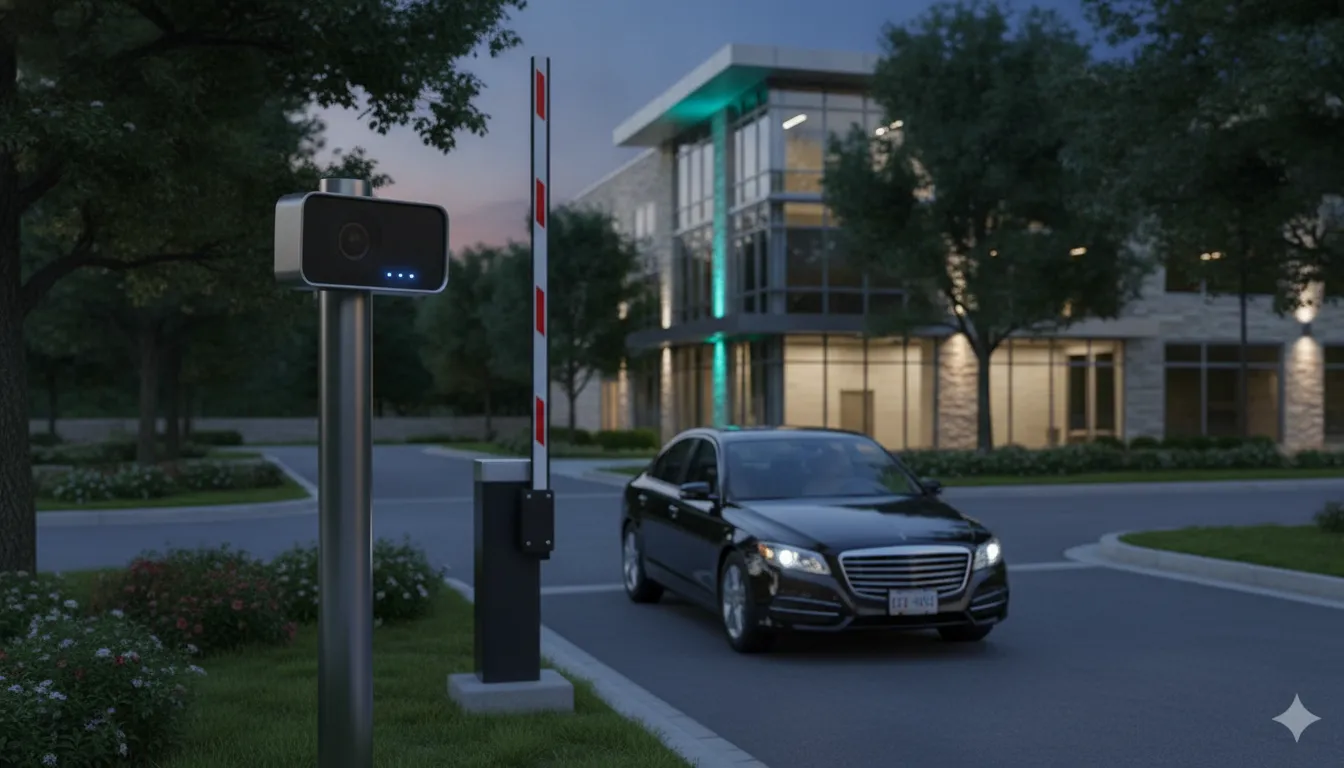
A vehicle entering a parking lot, loading area, dealership, or controlled gate can be an important security event. A general overview camera may show the event. A properly designed plate-recognition view can help connect it to a specific vehicle and time.
License plate recognition cameras use specialized cameras and software to capture and analyze plate information. The system stores the result, then compares it with approved databases or vehicle lists for records and alerts. Its value depends on more than the camera itself. Lane geometry, plate angle, lighting, weather, retention policies, and access control integration all shape the result.
For a Chicago-area business, the strongest design treats LPR as one layer of a broader security system. It can document entries and exits. It can also support investigations or help authorize gate access. Overview cameras and monitoring add essential context. That starts with understanding the system workflow.
Request your free security assessment
What Are License Plate Recognition Cameras and How Do They Work?
License plate recognition cameras, also called automatic license plate recognition (ALPR) cameras, combine a specialized camera with software that turns vehicle observations into searchable security records. The system is designed to read a plate as a vehicle approaches a driveway, parking entrance, loading area, or controlled gate. It can then compare the plate with approved lists, watch lists, or other databases configured for the property.
The process has several connected stages:
1. Capture the plate
A dedicated camera captures images as a vehicle moves through a defined field of view. Position matters. The lens must see the plate at a usable angle, with enough detail to distinguish characters and with minimal distortion or motion blur. High resolution and a fast shutter speed help preserve detail when vehicles are moving. Night installations may also use infrared illumination to support plate capture in darkness. The U.S. Department of Homeland Security explains that ALPR systems use cameras and software to automatically capture, analyze, and store license plate information. Read the DHS overview of automatic license plate readers.
2. Analyze and compare
Software processes the image and interprets the visible plate characters. Depending on the system design, that result can be compared against a database of authorized vehicles, restricted vehicles, or plates associated with a security incident. A match can create an alert for security staff, trigger a review, or support an access-control rule. For example, an LPR system integrated with access-control software may help automate gate entry for authorized vehicles.
3. Record the event
The system can store the plate reading with related event information, such as the image, time, and camera location. That creates a vehicle activity record that staff can search during an incident review. At a parking entrance, the record may help establish when a vehicle entered or exited. At a commercial gate, it can provide context alongside access-control and general surveillance footage. LPR works best as one layer of a business security system with cameras, not as a replacement for every other camera or security control.
What LPR can and cannot establish
LPR can help document that a particular plate was observed at a particular location and time, subject to image quality, database accuracy, and system settings. It does not automatically prove who was driving, who owns the vehicle, or what happened inside the property. It also should not be treated as facial recognition. The University of Wisconsin-Madison notes that its plate-reading system captures license plates and vehicle characteristics rather than personal identity details or facial images. Human review remains important, especially when a plate is obscured, misread, duplicated, or connected to a vehicle that changed hands.
A reliable deployment therefore depends on more than buying a camera. Site geometry, lighting, vehicle speed, data policies, alert rules, and integration with the broader security plan all affect the value of the evidence.
Where Do Businesses Use LPR Camera Systems?
The best location for an LPR camera is where a vehicle’s movement answers a specific security question. A parking entrance may need a complete record of arrivals and departures. A loading area may need to connect a vehicle record with a shipment, delivery window, or after-hours event. An automotive dealership may need visibility across a large inventory lot, while a controlled gate may need to decide whether an authorized vehicle can enter.
Parking-lot entrances
At a commercial parking entrance, license plate recognition cameras can record vehicles as they enter and leave, creating a searchable history of activity. That record can help a property manager review an incident, investigate an unauthorized visit, or compare vehicle movements with access logs. The camera should be dedicated to capturing the plate, rather than relying on a distant overview camera that shows the entire lot but cannot preserve readable plate detail. See our guide to license plate recognition cameras for parking lots for broader parking-area planning considerations.
Loading areas and delivery lanes
Loading docks often have changing traffic, large vehicles, blind spots, and activity outside standard business hours. LPR adds a vehicle record to the wider camera picture. A business can review which vehicle used a lane, when it appeared, and whether the movement matches an expected delivery or pickup. This does not replace dock-facing cameras or operational records. It gives investigators another reliable point of reference when a shipment, gate, or perimeter event needs review. For the surrounding camera strategy, see our article on integrating license plate recognition cameras at loading docks.
Automotive dealerships
Dealerships may have hundreds of vehicles distributed across customer parking, display rows, service entrances, and secured inventory areas. LPR can document vehicle movement at the property perimeter and identify when a car passes a monitored entrance or exit. That is useful for reviewing suspected inventory movement, after-hours activity, or repeated visits. The system should be designed around the dealership’s actual traffic patterns, with separate capture points where employees, customers, service vehicles, and inventory follow different routes.
Controlled vehicle gates
At a business campus, industrial property, gated community, or private lot, LPR can work with access-control software to support automated entry for authorized vehicles. The system compares the captured plate with the approved vehicle list, while the gate controller handles the physical access decision. This creates a clearer relationship between a vehicle record and an entry event, but it should not be treated as a reason to eliminate other controls. Credentials, visitor procedures, intercoms, and live review may still be appropriate for exceptions or unfamiliar vehicles. InVision Systems describes this type of integration through its commercial access control service.
Across all four settings, performance depends on a site-specific design. Camera position, lane geometry, lighting, weather, and vehicle speed affect whether the stored record is useful. A complete plan treats LPR as one focused layer within the business security system, not as a substitute for overview cameras, access control, or responsible incident review.
How Should You Position License Plate Recognition Cameras?
Positioning determines whether a camera sees a usable plate or only a passing vehicle. Treat the installation as a site-design exercise, not a matter of mounting the camera wherever power and network access are convenient. The objective is a consistent view of the plate as vehicles approach, pass, or stop at the controlled point.
- Define the lane and direction of travel. Start by identifying the exact lane the camera must read. Decide whether vehicles travel toward the camera, away from it, or through a turn. A single lane may need one carefully aimed camera, while multiple lanes may require separate coverage or a design that accounts for each lane independently. Do not assume one camera will provide equivalent plate views across a wide entrance.
- Choose a useful camera angle. Aim for the plate plane rather than a steep diagonal view. Excessive horizontal or vertical angle can distort characters, while vehicle movement can add blur. The University of Florida advises installing LPR cameras at an angle that captures plate characters without distortion or excessive motion blur. Review the UF guidance on license plate reader placement as part of the design process.
- Set height and distance around the capture point. Mounting height and setback should follow the actual gate, driveway, curb, and vehicle path. The camera needs a stable opportunity to see the plate at the intended point, without a nearby obstruction, sharp turn, or foreground object blocking the view. There is no universal distance that fits every entrance. Measure the site, account for vehicle types and approach geometry, then select the lens and mounting position together.
- Account for vehicle speed. A slow-moving vehicle at a gate presents a different capture challenge than a vehicle moving through an open parking entrance. Fast movement increases the need for an appropriate shutter speed and sufficient resolution. For background on how resolution and motion affect usable evidence, see this guide to security camera resolution requirements.
- Confirm the plate plane and camera view. Check whether plates sit level with the roadway or appear at changing angles because of ramps, slopes, speed bumps, or turning movements. Account for front-versus-rear plate capture and any unusual vehicle profiles expected on the property. The view should prioritize the plate while preserving enough context to understand which lane and vehicle produced the event.
- Test captures during commissioning. Test representative vehicles in each lane and direction, at the speeds the site actually produces. Review captured plates in daylight and darkness, and repeat after headlights, shadows, rain, or other site conditions change the image. Adjust aim, height, distance, focus, exposure, and illumination based on those captures. Site measurements and commissioning matter because a specification sheet cannot reveal every obstruction or movement pattern at a real Chicagoland property.
Document the final capture point, lane coverage, mounting position, and test results so future maintenance teams can restore the intended view after repairs or construction. This disciplined process makes LPR part of a dependable security design rather than an isolated camera pointed at an entrance.
What Lighting and Weather Conditions Affect Plate Capture?
Lighting and weather can determine whether a plate image is useful evidence or only a bright, blurred shape. Daylight is not automatically ideal. Direct sun, low winter sun, deep shadows, and a vehicle approaching with its headlights on can create uneven exposure. Glare from a reflective plate may wash out characters, while a dark entry lane can hide the plate before the camera adjusts.
At night and in other low-light conditions, infrared illumination can help a camera capture clear plate images in darkness. The University of Florida notes that IR illuminators are commonly used to maintain accuracy when visible light is limited. Read the University of Florida guidance on license plate readers for the underlying installation considerations. IR is not a substitute for site testing, however. Camera settings, plate reflectivity, vehicle speed, and the surrounding light environment still affect the result.
Headlights and reflective surfaces deserve particular attention during commissioning. A camera that performs well during a midday test may struggle when headlights point toward the lens at an entrance. The same applies to glare from wet pavement or bright snow. Rather than judging the system under one favorable condition, test representative approach directions and operating times, including daylight, darkness, and periods when the sun is low.
Rain, snow, and fog can reduce contrast and obscure characters. Water droplets on the lens or a protective window may create additional blur or flare. Snow can cover plates, change the background brightness, or narrow the usable vehicle path. Fog scatters light and may reduce the separation between the plate and its surroundings. Seasonal changes in Chicago-area conditions make these practical concerns, not theoretical edge cases.
Maintenance should be part of the design. Keep the lens, housing, and any illuminator window clean, inspect them after severe weather, and check for condensation, ice, dirt, or shifted mounts. Review captured images periodically instead of assuming that a working camera is producing readable evidence. If trees, temporary signs, construction, or new exterior lighting change the scene, retest the affected lane.
These checks are especially important for commercial security camera planning, where plate capture may support parking, loading, or gate decisions. A site-specific commissioning review can identify whether the issue is illumination, glare, motion, placement, or maintenance before the system is relied on during an incident.
How Do Retention, Privacy, and Access Policies Shape LPR?
The technology is only one part of a responsible license plate recognition cameras deployment. A business also needs clear rules for what the system is intended to do, who may use its records, and how long those records should remain available. These decisions should be made during system planning, not after an incident occurs.
Limit collection to a defined business purpose
Start with purpose limitation. A property may use LPR to document vehicle activity at a controlled gate, investigate a reported theft, support parking security, or alert staff when a vehicle on an approved watch list appears. Each purpose should be stated plainly. Avoid collecting or searching data simply because the system makes it possible. A defined purpose also helps determine which cameras belong at which entrances and which alerts deserve a response.
Retention should follow a written schedule developed through the business’s policy process and appropriate legal review. There is no single retention period that fits every organization or location. The schedule can distinguish routine vehicle records from records preserved for a documented incident. It should also address deletion, holds, backups, and responsibility for reviewing exceptions.
Control access and document use
Role-based access keeps everyday users from seeing more than they need. For example, security personnel may review current alerts, while a smaller group of authorized managers may search historical records or approve exports. Unique accounts, strong authentication, and prompt removal of access when responsibilities change are practical safeguards.
Audit trails add accountability. Record who viewed, searched, exported, or changed an LPR record, along with the time and reason when the system supports those fields. Periodic review can identify unusual searches and confirm that access matches the business purpose. If a record is shared with law enforcement or another authorized party, document the request, approval, scope, and transfer.
Review notice and incident procedures
Signage and privacy notices should be reviewed with the organization’s policies and legal advisers. The wording, placement, and visibility should match the actual operation of the cameras. This is a planning and review issue, not a reason to copy a generic notice from another property.
Finally, define the incident workflow before relying on an alert. Staff should know how to verify a plate, preserve relevant video, escalate a concern, and avoid treating an automated match as proof by itself. The University of Wisconsin-Madison explains that its system captures plates and vehicle characteristics, not personal identity details or facial recognition: UW-Madison’s LPR data policy. That distinction matters. Plate and vehicle data can help establish when a vehicle was present, but it does not automatically identify the driver or passengers. A thoughtful policy keeps that boundary clear while supporting a useful, reviewable security process.
How Does LPR Fit Into a Complete Business Security Design?
License plate recognition works best as a focused layer within a broader security plan. It can document vehicle movement and support alerts, but it does not replace wide-area video, controlled entry, or human response. A complete design assigns each component a clear job, then connects the pieces so an event can be reviewed from more than one viewpoint.
| Security layer | Primary job | How it supports the design |
|---|---|---|
| LPR cameras | Capture and search plate information at defined vehicle lanes | Creates time-stamped vehicle records and can support alerts or gate decisions when connected to approved databases and rules. |
| Overview cameras | Show the wider scene around driveways, lots, docks, and buildings | Provide context such as vehicle type, direction of travel, nearby activity, and conditions that a tight plate image cannot show. |
| Access control | Manage who or what is permitted through a gate or door | Integrating LPR with commercial access control can support automated entry for authorized vehicles while preserving an event record. |
| Monitoring | Evaluate alerts and coordinate an appropriate response | Staff or a remote monitoring team can review events, follow escalation procedures, and connect vehicle activity with live or recorded video. |
Connect the evidence, not just the equipment
During design, establish where each event will be stored and how an authorized user will retrieve it. Depending on the selected architecture, an NVR or cloud platform can preserve LPR captures alongside overview footage, access events, and alert history. Searchable records are most useful when timestamps, camera names, lane locations, and retention settings are consistent. The U.S. Department of Homeland Security describes ALPR as cameras and software that captures, analyzes, stores, and compares plate information. Those recording and software layers matter as much as the camera itself: DHS explains how automatic license plate readers work.
Plan the physical installation and response path
Structured wiring may be appropriate when a facility needs dependable network connections between cameras, gates, recording equipment, and monitoring workstations. The installation should account for lane geometry, lighting, weather exposure, and vehicle speed before equipment is selected. High resolution and fast shutter speed help distinguish plate characters on moving vehicles, but the final result depends on the complete site design.
Commissioning should include test captures during relevant day and night conditions, confirmation that alerts reach the right users, and a review of what happens when a plate is unreadable or a gate controller is offline. Ongoing support then keeps camera views, storage, network connections, and alert rules aligned as the property changes. A broader business security system with cameras gives decision-makers one coordinated framework instead of a collection of disconnected devices.
Request your free security assessment
Frequently Asked Questions
Can license plate recognition cameras read every plate?
No. Capture quality depends on the camera angle, distance, vehicle speed, plate condition, lighting, and weather. The camera must see enough of the plate without distortion or excessive motion blur. High resolution and a fast shutter speed help distinguish characters on moving vehicles, but a site assessment and test captures are still important.
How far away can an LPR camera read a plate?
There is no single reliable distance for every installation. The usable range depends on the selected camera, lens, mounting height, lane geometry, and how quickly vehicles pass the capture point. A qualified designer should calculate the field of view for each lane rather than assume that a general security camera can identify plates from far away.
Do license plate recognition cameras work at night?
They can, when the system is designed for nighttime conditions. Infrared illumination helps capture clear plate images in darkness, while exposure, headlights, glare, rain, snow, and fog still require attention. Positioning the camera and testing it during actual low-light conditions helps reveal problems before the system is relied on for evidence. The University of Florida explains the role of angle, placement, and IR illumination.
Do LPR cameras identify people?
License plate recognition is intended to capture vehicle and plate information, not facial images or personal identity details. It can create searchable vehicle records and support alerts when a plate matches an approved list or security database. Businesses should still define retention, user permissions, notice, and incident-review practices with appropriate legal guidance. UW-Madison describes this distinction in its data policy resources.
Schedule Your Free Security Assessment
License plate recognition works best when it is planned as part of the full business security design. InVision Systems can review your entrances, parking areas, loading zones, lighting, vehicle flow, and access-control goals, then help identify a practical camera strategy for your property.
Contact InVision Systems to discuss a security assessment for your business.