
Loading Dock Security Cameras: Protecting Your Blind Spots
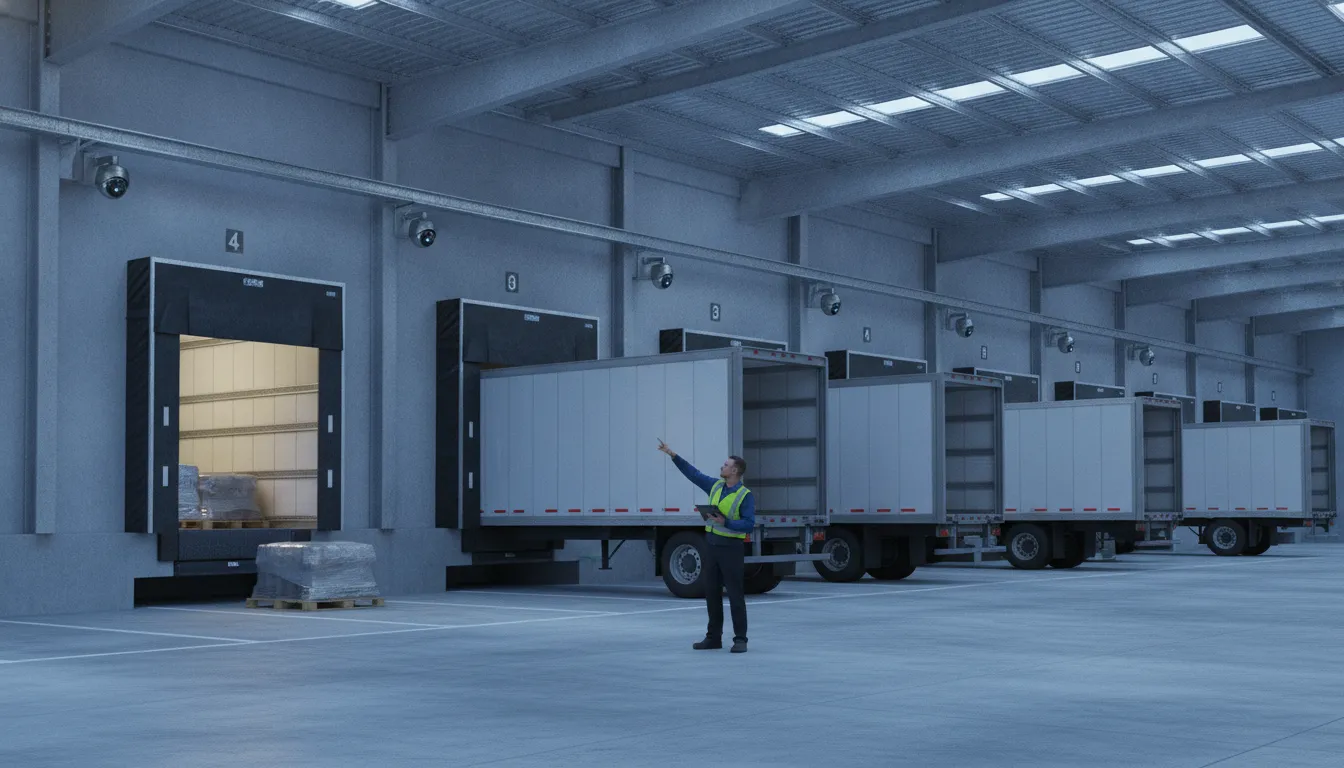
Loading docks move products, people, and vehicles through the same space, often under changing light and tight delivery schedules. That combination can create blind spots, confusion about who is authorized to enter, and limited visibility when a loss or injury is reported.
Effective loading dock security cameras do more than record deliveries. They cover bay doors from both sides, the immediate perimeter, and the yard. Then work with access control, alarms, lighting, and monitoring to identify unusual activity and support a timely response.
A well-designed system also accounts for ceiling height, vehicle movement, nighttime conditions, and the areas where delivery personnel transition into restricted back-of-house space. With the right camera views and integrated controls, facility managers can improve accountability without turning every delivery into a disruption. The first step is understanding why these areas are especially difficult to secure.
If your dock or back-of-house area has gaps in coverage, a professional assessment can identify exactly where cameras, access control, and monitoring add the most value.
Request your free security assessment now
Why Loading Docks and Back-of-House Areas Are Vulnerable
Loading docks are designed to keep products moving, not to function as controlled front entrances. Trucks arrive throughout the day, doors open and close repeatedly, and employees, carriers, contractors, and visitors may enter through overlapping routes. That activity creates opportunities for unauthorized access, especially when a facility treats the dock as a single camera angle rather than a connected security zone.
Docks are a primary entry point for more than 40% of unauthorized facility access attempts. The risk extends beyond someone entering the building. A person can approach through the yard, move along the exterior of a trailer. Slip through a partially open bay door, or use a poorly observed interior passage toward inventory and restricted areas. Without coverage from multiple perspectives, security teams may see an event only after a person or vehicle has crossed the most important boundary.
Open doors create moving blind spots
Bay doors change the visual conditions of a facility every time they open. Outdoor glare can wash out an interior image, while low light inside the building can obscure faces, packages, or vehicle details. Trailers, pallets, forklifts, and parked vehicles can also block a fixed view. For that reason, a well-planned system should cover each bay door from both inside and outside, along with the immediate perimeter and yard. This layered approach helps maintain visibility as people and equipment move through the area.
Back-of-house spaces create similar challenges. Receiving corridors, staging areas, employee entrances, cage storage, and waste or maintenance zones often receive less attention than the main lobby. Yet these areas may connect directly to valuable inventory or provide a route around visitor controls. The right warehouse loading dock security plan accounts for these transitions instead of focusing only on the loading bays themselves.
The financial impact reaches beyond stolen cargo
Cargo theft from loading areas exceeded $20 billion in losses in 2024. Even when a shipment is not stolen outright, missing products, damaged goods, shipping disputes, and unverified handoffs can create substantial costs. Inventory shrinkage can cost logistics companies up to 3% of annual revenue, putting pressure on margins that are already affected by labor, transportation, and storage expenses.
Loading dock security cameras support more than post-incident review. When integrated with access control, lighting, alarms, or remote monitoring, they help security teams identify unusual activity earlier and respond while an event is still developing. The goal is not to make normal receiving work difficult. It is to give operations leaders clear visibility across the routes where routine movement and genuine risk overlap.
How Loading Dock Security Cameras Reduce Theft, Shrinkage, and Liability
A loading dock camera system should do more than create a video archive after something goes missing. Properly designed commercial loading dock security cameras help make suspicious activity visible, create timely alerts, and give staff or remote security personnel an opportunity to intervene before a loss becomes an incident.
That proactive approach starts with image quality. A 4K camera can preserve the detail needed to distinguish people, packages, labels, and vehicle activity across a broad dock area. Infrared night vision supports visibility during overnight receiving and shipping, while motion detection helps focus attention on activity rather than hours of uneventful footage. These features are most useful when they are selected for the actual distance, lighting, and traffic patterns at the facility, rather than treated as interchangeable specifications.
Designed for changing light and difficult dock environments
Loading docks often combine bright outdoor daylight, shadowed trailers, overhead fixtures, and high ceilings. A camera that performs well in one part of the scene can lose detail when a trailer door opens or a vehicle moves between sunlight and a darker bay. True wide dynamic range, or WDR, helps manage those extreme transitions. For demanding commercial environments, a WDR rating of 120dB or higher is a useful benchmark to discuss during system design. Ceiling height matters as well. Docks with mounting points 20 to 40 feet above the floor may require careful lens selection, mounting angles, and supplemental coverage to keep faces and activity identifiable.
Placement and analytics turn those capabilities into prevention. Motion rules can flag movement in a closed dock after hours, activity near a restricted door, or unexpected presence in a trailer staging area. Real-time AI analytics can support active deterrents, including remote voice intervention, when a person enters an area without authorization. A clear announcement that the area is monitored may stop an opportunistic theft before it progresses. The goal is not to record every event and review it later. The goal is to shorten the time between detection and response.
Proactive monitoring programs have been reported to reduce theft incidents by up to 60 percent compared with passive recording alone. Results depend on camera placement, alert configuration, staffing, and response procedures, so this figure should be treated as a potential outcome rather than a guarantee. Even when an incident occurs, searchable footage and consistent event records can help operations teams investigate inventory shrinkage. Resolve delivery disputes, and document conditions for insurers or other stakeholders. In this way, the system supports both loss prevention and liability management.
Where to Place Loading Dock Security Cameras for Full Coverage
A loading dock rarely has a single point of risk. Drivers approach from the yard, employees move between interior and exterior spaces, and open bay doors can create temporary sightline gaps. A placement plan should follow those movements rather than simply mounting cameras wherever power and network connections are easiest to reach. The goal is a continuous view from the property edge to the receiving area, with enough detail to support a timely response.
- Cover every bay door from both sides. Install an exterior view facing the approach and trailer position, then add an interior camera aimed across the threshold and into the dock zone. The two angles help document activity as vehicles arrive, doors open, and goods move inside. They also reduce the blind spot created when a trailer, raised door, or parked vehicle blocks one camera’s view.
- Extend coverage across the immediate perimeter. Add cameras along the walls, corners, employee walkways, and areas beside dock doors. These views help security teams see how someone reached the dock, not only what happened after entry. Pay particular attention to fence lines, side doors, utility areas, and other routes that may be outside the normal delivery path.
- Watch the yard as an active security zone. Position cameras to cover trailer staging spaces, truck lanes, parking areas, and turning points. Yard coverage should preserve useful views at night without relying on a single wide shot that leaves faces or vehicle details too small to identify. A well-designed system balances overview cameras with closer views at the locations where people and vehicles stop.
- Add license plate recognition at vehicle entry and exit points. LPR cameras can support automated license plate recognition and improve delivery documentation. Place them where vehicles naturally slow down, and account for the direction of travel, mounting height, headlights, and changing daylight. This is different from general yard surveillance, which provides context but may not capture a readable plate.
- Use overlapping views to build a 360-degree strategy. Camera placement should allow one view to confirm what another view sees. That coverage makes it easier to track movement between the yard, perimeter, bay threshold, and interior dock. A 360-degree approach can reduce incident response times by up to 40%, according to the supplied research, because operators spend less time searching for the relevant angle.
- Design lighting with the cameras. Bright sunlight outside a dark dock, glare from headlights, and poorly lit corners can all create unusable footage. Use consistent, strategically positioned lighting to reduce shadows and preserve detail at doors and walkways. During a professional assessment, review lighting, ceiling height, mounting surfaces, and vulnerability points together. InVision Systems can design a commercial loading dock security cameras system around those conditions instead of treating each camera as an isolated device.
The final layout should reflect your delivery schedule, traffic patterns, and operational priorities. A facility handling frequent overnight shipments may need a different balance of perimeter, yard, and threshold coverage than a plant with controlled daytime deliveries.
Access Control for Delivery Personnel and Restricted Areas
Loading docks often need to remain accessible without becoming an unrestricted route into a facility. Delivery drivers, vendors, contractors, and employees may all require different levels of access, particularly when the dock connects directly to inventory, production, or administrative areas. A well-designed system verifies who should enter, limits where they can go, and creates a record of each event.
Badging or other credentialed access gives facility managers a practical way to authenticate delivery personnel. A driver can receive a temporary credential that works only during an approved delivery window and only at designated entrances. Employees who need regular dock access can use individual credentials tied to their roles. Visitor logs add another layer of accountability by recording who arrived, when access was granted, and when the visit ended.
These controls should extend beyond the exterior dock door. Internal doors leading from the loading area to a warehouse, stockroom, production floor, or office corridor can be restricted according to the person’s authorization. That helps prevent a legitimate delivery from turning into unmonitored movement through the rest of the building. It also makes it easier to adjust permissions when a contractor’s assignment ends or an employee’s responsibilities change.
Integrating loading dock security cameras with access control ensures that only authorized personnel enter restricted loading areas. When a door controller, credential reader, and camera work together, the facility can associate a visual event with a specific access attempt. A successful badge scan can be logged alongside the corresponding video, while a denied credential, propped door, or forced entry can prompt immediate review. This combined record is more useful than either a camera clip or an access report by itself.
Integration also supports a more consistent response. Security or operations personnel can compare the delivery schedule with the visitor log. Confirm that the person at the door matches the credential, and investigate unusual activity without relying solely on memory. In a larger warehouse or distribution center, these records can help identify recurring process issues, such as credentials being shared or doors being left unsecured.
InVision Systems designs access control systems around the facility’s traffic patterns, restricted areas, and operating procedures. For a broader look at how credentialing and monitored entry can reduce exposure, review this guide to access control for delivery personnel. The goal is not to slow down a well-run dock. It is to make authorized movement simple while making unauthorized movement visible and difficult.
AI, Virtual Guarding, and Remote Monitoring for Docks
Loading dock activity produces a steady stream of vehicles, pallets, packages, and people. A camera system can document that activity, but AI-enabled tools can make the information easier to use. License plate recognition can associate vehicles with arrival and departure events, while barcode and QR scanning can support shipment documentation. Automated logging creates a searchable record of activity instead of requiring a team member to review hours of video manually.
These capabilities are especially useful when a facility needs to compare what was expected with what actually happened. For example, a security or operations team may review which vehicle entered a dock, when it arrived, and whether activity occurred in a restricted area. AI alerts can also draw attention to unusual movement or unauthorized personnel while the event is happening. The goal is not to replace sound operating procedures, but to help staff focus on exceptions that deserve immediate attention.
Remote oversight extends that protection beyond the hours when an on-site team is available. Virtual guarding can use a facility’s existing cameras, where the infrastructure is suitable, and connect those feeds to trained remote personnel. This approach can provide a cost-effective alternative or supplement to physical guards, particularly for facilities that need consistent observation across multiple dock doors, yards, or access points.
Virtual monitoring is most valuable when it includes an active response plan. Real-time AI analytics can identify a defined event, such as a person entering a restricted dock area, and prompt remote human intervention. A remote operator may use an integrated speaker system to issue a voice warning. Direct an individual away from the area, or escalate the event according to the facility’s procedures. That immediate interaction can deter an incident before it becomes theft, trespassing, or a safety concern.
For a closer look at the operating model, review this guide to virtual security guards for loading docks. A qualified integrator should evaluate camera compatibility, lighting, speaker placement, alert rules, and escalation procedures together. When those elements are designed as one system, loading dock security cameras become part of a proactive security operation rather than a passive archive.
Choosing the Right Loading Dock Security Camera System
The right system depends on what your dock needs to identify, monitor, and deter. A facility that only needs general activity awareness may not need the same camera specifications as a distribution center that must read license plates. Document vehicle movements, and monitor several dock doors after dark. Start with the site conditions, then match the equipment to the risk.
Resolution is especially important when cameras must capture license plates or distinguish details at a distance. 4K or another high-resolution option can provide more usable detail than a basic camera, provided the lens, mounting height, and lighting are selected correctly. Infrared night vision supports visibility after business hours, while motion detection helps operators focus on activity instead of reviewing hours of empty footage.
Dock thresholds also create difficult lighting changes. A camera may face a bright outdoor yard, a shaded loading bay, and a dark interior within the same view. Wide dynamic range, ideally 120dB or higher for severe transitions, helps preserve usable detail in those conditions. Equipment should also be rated for the environment. Ruggedized, weather-resistant housings, such as IP67-rated models where appropriate, can better withstand dust, moisture, temperature changes, and the routine impact of an active dock.
| System level | Resolution | Night vision | Analytics | Best fit |
|---|---|---|---|---|
| Entry-level | 1080p or comparable standard HD | Basic infrared | Motion detection | Small facilities needing general dock awareness |
| Mid-tier | 4K or high-resolution camera | Enhanced infrared with improved low-light detail | Motion detection, defined activity zones, and event alerts | Warehouses and commercial facilities monitoring vehicles, doors, and personnel |
| Enterprise AI-enabled | 4K or higher, selected for distance and identification needs | Advanced infrared, WDR 120dB or higher where lighting demands it | Edge or cloud AI, human and vehicle detection, license plate recognition, and automated logging | Multi-dock industrial sites requiring proactive response and operational documentation |
AI and edge processing can turn footage into actionable information. Depending on the system, analytics may identify people or vehicles, support license plate recognition, and create automated event logs. More advanced deployments can connect alerts to active deterrents, including remote voice intervention. The best commercial loading dock security cameras are therefore selected as part of a complete design that accounts for coverage, lighting, network capacity, access control, and how your team will respond to alerts.
Structured Wiring and Professional Installation Are the Foundation
A loading dock camera system is only as dependable as the network carrying its video. Structured wiring provides the high-speed data transmission modern high-definition and AI-enabled cameras require. It gives cameras a stable connection for clear video, timely alerts, and dependable access to recorded footage when an incident needs to be reviewed.
Critical dock cameras should not depend on spotty Wi-Fi. Metal structures, concrete walls, moving equipment, distance from access points, and changing warehouse layouts can all interfere with wireless performance. A brief connection loss at a bay door can mean missing the moment a delivery vehicle arrives, a restricted door opens, or an unauthorized person enters. Properly planned cabling keeps the core security infrastructure consistent as the facility operates around it.
When a dock cannot depend on Wi-Fi coverage, a wired or local-storage design can keep footage available. Our security cameras without WiFi guide explains the main options before you plan coverage for a warehouse or distribution facility.
Professional installation also starts before any cable is pulled. A consultant evaluates how lighting changes throughout the day, where shadows form, how high the ceilings are, and which vulnerability points deserve priority. Camera placement may need to account for glare from open dock doors, headlights in the yard. Dust, vibration, and the viewing angle needed to identify people, vehicles, or activity around a shipment. The goal is not simply to install more cameras. It is to create useful coverage with minimal blind spots.
That design should connect the cameras with the rest of the facility’s security plan. Cabling routes, network capacity, power requirements, recording equipment, access control, lighting, and future expansion all affect the installation. In a busy warehouse or distribution center, technicians must also protect cables from damage caused by forklifts, pallet movement, and routine maintenance.
With a consultative design, installation, and support plan, your system remains useful after the initial deployment. InVision Systems can design and support commercial loading dock security cameras around the way your facility actually receives, stages, and ships goods, including the conditions found in industrial and commercial properties across the Chicago area.
If your dock has coverage gaps, a professional assessment can show you exactly where cameras. Access control, and monitoring will add the most protection before you invest in new equipment.
Schedule your free loading dock assessment today
Frequently Asked Questions
What is the best security camera system for a loading dock?
The right system combines high-resolution cameras, wide coverage, infrared night vision, and motion detection. For many facilities, 4K cameras help capture useful detail around vehicles, people, and cargo. AI-enabled analytics can add alerts for unauthorized personnel and support license plate recognition. The best design also accounts for lighting, ceiling height, traffic patterns, and the difference between indoor and outdoor dock conditions.
Where should security cameras be placed on a loading dock?
Start with the bay door from both the inside and outside, then extend coverage to the immediate perimeter and yard. This approach helps reduce blind spots as vehicles and delivery personnel move between the dock and the property. Cameras may also be appropriate in back-of-house corridors, restricted access points, and staging areas, depending on the facility layout and operational risks.
How can AI improve loading dock security?
AI can help distinguish relevant activity from routine motion and send alerts when people or vehicles appear in restricted areas. Depending on the system, analytics may support license plate recognition, barcode scanning, automated logging, and real-time responses. When connected to remote monitoring, an alert can support a live voice intervention instead of leaving the event for someone to review later.
Can existing cameras be used for virtual guarding at a loading dock?
In many cases, yes. Modern virtual guarding systems can use an existing camera infrastructure if the cameras provide adequate coverage, image quality, and reliable connectivity. A professional assessment can identify which cameras can be retained, where additional views are needed, and how remote operators can respond to activity at the dock.
Can loading dock cameras integrate with access control?
Yes. Integrating cameras with access control helps connect a door event or credential use with video of the person entering. Facilities can use that combination to limit restricted dock areas to authorized personnel, investigate exceptions, and maintain clearer operational records for deliveries and access activity.
Protect Your Facility’s Blind Spots With a Custom Security Plan
Loading docks and back-of-house areas carry the most inventory, vehicle, and people movement in a facility. They are also where a security plan often has the largest gaps. The right mix of camera placement, access control, AI analytics, and remote monitoring turns those blind spots into covered, documented zones that deter loss.
InVision Systems designs and installs commercial and industrial security systems across the Chicago area, including Northwest Indiana and Southeast Wisconsin. Our team reviews your dock layout, lighting, delivery schedule, and restricted areas before recommending equipment, so the final system is built around how your facility actually works.