8 Best Outdoor Security Cameras Without Subscription

There’s a common myth that if you skip the monthly subscription, you’re settling for a lower-quality security camera. People assume you’ll get grainy video, miss out on important alerts, and be left with a device that can’t stand up to harsh weather. That simply isn’t true anymore. Technology has advanced so much that many subscription-free cameras now outperform their subscription-based competitors. The best outdoor security camera without subscription offers crystal-clear resolution, smart motion detection, and durable construction. In this guide, we’ll bust these myths and show you what to look for in a high-performing, fee-free camera that gives you complete control over your property’s security.

Key Takeaways

  • Skip the monthly fees and own your footage: Subscription-free cameras save you money with a one-time hardware purchase. Storing video locally on an SD card or NVR also means you have complete control over your data and privacy.
  • Focus on essential hardware features: You don’t need a subscription for great performance. Prioritize cameras with clear video resolution (at least 1080p), reliable night vision, and a durable, weatherproof rating to ensure your system works when you need it most.
  • Plan for the entire system, not just the camera: A successful security setup includes more than the camera itself. Consider your storage capacity, power source, and whether a DIY or professional installation will best secure your property and prevent blind spots.

What Is a Subscription-Free Outdoor Security Camera?

A subscription-free outdoor security camera is exactly what it sounds like: a camera you can use without paying any monthly fees. Instead of sending your video footage to a cloud server, which usually requires a subscription, these cameras store everything locally. This is typically done on a microSD card inserted directly into the camera or on a central hub, like a Network Video Recorder (NVR), that stays inside your home or business.

The biggest advantage here is the long-term savings. You make a one-time purchase for the hardware, and you’re done. This straightforward approach is perfect if you want to manage your security budget without worrying about recurring charges. This local storage model also means you have complete control over your recordings. Your video data stays with you, on your property, which is a major plus for privacy.

While many popular cameras tie their best features to a monthly plan, plenty of subscription-free security cameras offer excellent video quality, motion alerts, and other essential functions. The main difference is that you’ll be responsible for monitoring your own alerts and footage, as professional monitoring services are typically part of a subscription package. For many property owners, having direct control and no extra fees is the ideal setup for their residential security plan.

Our 8 Favorite Outdoor Security Cameras Without a Subscription

Finding the right outdoor security camera can feel overwhelming with so many options on the market. To simplify your search, we’ve put together a list of our favorite cameras that don’t require a monthly subscription. These models offer a great mix of features, from high-resolution video to durable, weatherproof designs, ensuring you can find the perfect fit for your home or business. Whether you need to monitor a small entryway or a large commercial property, there’s a subscription-free solution here for you.

1. InVision Systems Professional Grade Cameras

While off-the-shelf cameras are great for many situations, a truly effective security plan often requires a more tailored approach. Our professional-grade cameras are designed as part of a complete, customized security system built specifically for your property. We focus on providing superior image quality, exceptional durability to withstand harsh Midwest weather, and seamless integration with other security components like access control and alarm systems. With our solutions, you’re not just buying a camera; you’re getting a system designed, installed, and supported by experts who ensure every angle is covered. This is the ideal choice for commercial, industrial, or residential clients who need guaranteed performance and reliability.

2. Eufy Security S340 SoloCam

If you need to watch over a large yard or parking lot, the Eufy Security S340 SoloCam is a fantastic choice. It gives you 360-degree coverage and uses AI to track movement, so nothing goes unnoticed. Best of all, it operates without any monthly fees, making it a cost-effective way to secure your property. Its combination of wide coverage and smart tracking makes it a standout among subscription-free cameras for monitoring expansive areas. The dual-camera setup provides both a wide-angle view and a telephoto lens for zooming in on details, all without image distortion.

3. Reolink Altas PT Ultra

For those who prioritize crystal-clear video, the Reolink Altas PT Ultra is hard to beat. It delivers stunning 4K resolution, which means you can zoom in on details like license plates from a distance without losing clarity. Its 360-degree auto-tracking follows any activity, and the color night vision ensures you get detailed, full-color footage even after dark. This is a huge step up from the grainy, black-and-white video you might be used to with older cameras. It’s a powerful option for anyone needing high-quality surveillance around the clock.

4. TP-Link Tapo C120

The TP-Link Tapo C120 strikes a great balance between performance and price. It records in sharp 2K QHD quality and is built to withstand the elements with an IP66 weatherproof rating, so it can handle rain, snow, and dust. One of its best features is the support for a large MicroSD card (up to 512GB), giving you plenty of space for local video storage. This makes it a reliable and affordable choice for homeowners who want solid features without breaking the bank, as noted in several camera comparisons.

5. Lorex 4K Ultra HD Security Camera

Lorex has a strong reputation for reliability, and its 4K Ultra HD Security Camera lives up to it. This camera provides exceptional video quality and features color night vision for clear footage in low light. What makes it particularly versatile is its compatibility with NVR/DVR systems. This means you can easily integrate it into a larger, wired security setup, making it a great choice for both homes and businesses looking to build a more comprehensive security system. Its durable construction also ensures it will hold up for years to come.

6. Wyze Cam v4

If you’re looking for an affordable camera that still packs a punch, the Wyze Cam v4 is an excellent pick. It offers impressive 2.5K video resolution, which is a noticeable improvement over standard 1080p. The built-in spotlight is a great deterrent and helps capture clearer video at night. Like other subscription-free models, it supports a MicroSD card for local storage, giving you control over your footage. It proves that you don’t need to spend a lot to get a feature-rich camera that can be used both indoors and outdoors.

7. Blink Outdoor 4

For those who value convenience and easy installation, the Blink Outdoor 4 is a top contender. Its main draw is an incredible two-year battery life, so you can set it up and forget about it for a long time. It’s completely wire-free, making placement a breeze. While it’s designed to work with a cloud subscription, you can add the Sync Module 2 to save video clips locally to a USB drive. This flexibility makes it a practical and low-maintenance choice for homeowners who want a simple yet effective security solution.

8. Eufy Solo Cam S230

The Eufy Solo Cam S230 is another great wire-free option designed specifically for the outdoors. It records in crisp 2K video and has color night vision for better visibility after sunset. What sets it apart is the option to connect a solar panel, which keeps the battery charged and reduces maintenance even further. With its 8GB of built-in local storage, you can avoid monthly fees entirely. Consumer Reports highlights it as one of the best home security cameras without a subscription, especially for those looking for a sustainable, set-it-and-forget-it solution.

What to Look For in a Subscription-Free Outdoor Camera

Choosing the right outdoor security camera without a subscription feels a lot like buying a car. You know you need one, but the sheer number of features can be overwhelming. The good news is that once you know what to look for, you can easily find a camera that fits your property’s specific needs without locking you into monthly fees. The key is to focus on the hardware and built-in software features, since you won’t be relying on a cloud service to fill in the gaps.

Think about what you truly need your camera to do. Is your main goal to get a clear shot of your driveway? Or do you need to monitor a large commercial lot after hours? Your answers will guide you toward the right specifications. From video resolution that captures critical details to a power source that makes sense for the location, every feature plays a role in how effective your security will be. We’ll walk through the most important things to consider so you can make a confident choice for your home or business.

Video Quality and Resolution

When it comes to security footage, clarity is everything. A blurry, pixelated video won’t help you identify a face or read a license plate. That’s why you should look for a camera with at least 1080p (Full HD) resolution. For even greater detail, many modern cameras offer 4K (8MP) or higher resolutions, which can make a significant difference when you need to zoom in on a specific part of the recording. High-resolution security cameras ensure that the footage you capture is actually useful, giving you a clear picture of what’s happening on your property.

Night Vision Capabilities

Your property needs protection around the clock, not just during the day. Effective night vision is a non-negotiable feature for any outdoor camera. Most cameras use infrared (IR) LEDs to see in the dark, producing a black-and-white image. Some newer models offer color night vision, which uses ambient light to create a full-color picture. This can be incredibly helpful for identifying details like the color of a car or a person’s clothing. For the best results, consider adding motion-activated floodlights to the area, as more light always leads to clearer night footage.

Weather Resistance and Durability

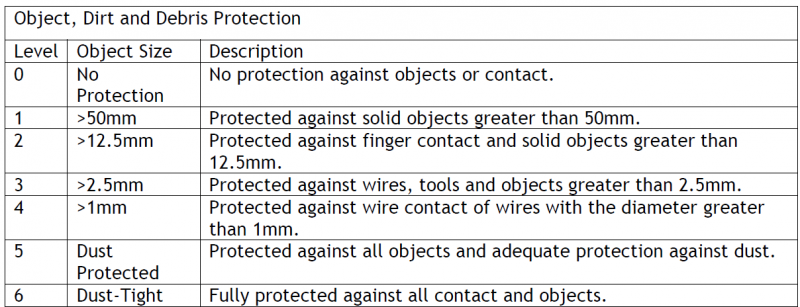
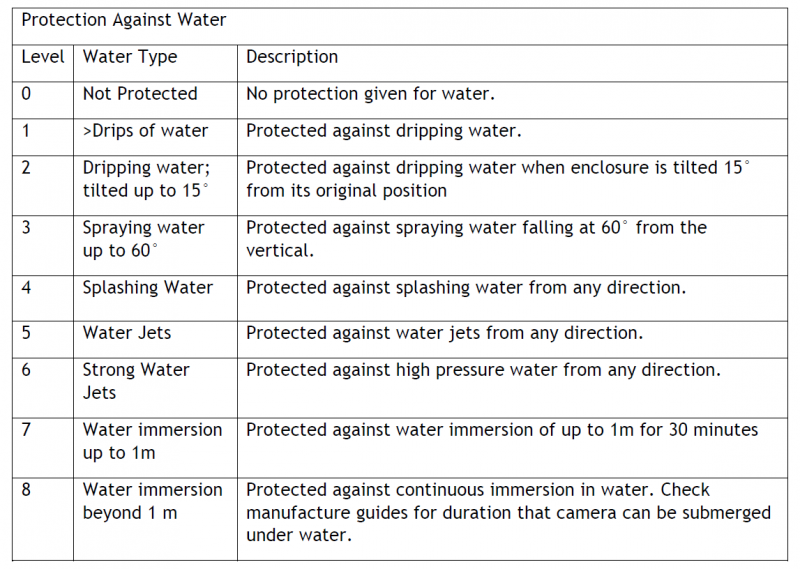
Outdoor cameras have to withstand whatever Mother Nature throws at them, from summer thunderstorms to Midwest winters. Look for a camera with an IP (Ingress Protection) rating of at least IP65. This number tells you how well the device is protected against solids (like dust) and liquids (like rain and snow). An IP65-rated camera is dust-tight and can handle water jets, while IP66 and IP67 offer even more protection. A durable, weather-resistant camera will keep working reliably for years, making it a smart long-term investment for your residential or commercial property.

Local Storage Options

The defining feature of a subscription-free camera is its use of local storage. Instead of sending your video to the cloud, the camera saves recordings directly to a physical device you own. The most common options are a microSD card that you insert into the camera itself or a Network Video Recorder (NVR). An NVR is a dedicated device that can store footage from multiple cameras in one central location. This gives you complete control over your data, with no monthly fees for storage. You decide how much footage to keep and who gets to see it.

Motion Detection and Smart Alerts

You don’t want your phone buzzing every time a stray cat wanders into your yard. Modern subscription-free cameras come with smart motion detection that can differentiate between people, vehicles, and other movements. This significantly reduces false alarms and ensures you only get alerts for things that actually matter. These smart features are often built directly into the camera’s software, so you don’t need a subscription to use them. Quick, accurate alerts allow you to respond to potential security events as they happen.

Two-Way Audio Features

Two-way audio turns your security camera into an intercom. A built-in microphone and speaker let you hear what’s happening and speak to anyone on your property through an app on your phone. This is incredibly useful for everything from instructing a delivery driver where to leave a package to warning off a potential intruder. The ability to communicate in real-time adds a proactive layer of security, allowing you to interact with visitors (welcome or otherwise) from anywhere.

Power Source and Battery Life

How you power your camera is a major consideration. Wired cameras, including Power over Ethernet (PoE) models, offer a consistent and reliable power source, so you never have to worry about a dead battery. However, they can be more complex to install. Battery-powered cameras are much easier to set up and can be placed almost anywhere, but you’ll need to recharge or replace the batteries periodically. For a low-maintenance, eco-friendly option, some battery-powered cameras can be connected to a small solar panel, providing a continuous charge.

Subscription vs. Subscription-Free: How Do They Compare?

Choosing between a security camera with a subscription and one without feels like a major decision, and it is. The right choice depends entirely on your budget, security goals, and how you want to manage your video footage. While subscription services offer convenience and advanced features, subscription-free cameras provide a straightforward, cost-effective alternative. Let’s break down the key differences to help you figure out which path makes the most sense for protecting your property.

The main distinction comes down to ongoing costs and where your video is stored. Subscription plans typically bundle cloud storage and extra software features for a monthly or yearly fee. In contrast, subscription-free models involve a one-time purchase of the hardware, with video saved to a local storage device you control. Both approaches have their place, but understanding their specific pros and cons is essential before you invest in a system.

Long-Term Costs

The most obvious difference is how you pay. With a subscription-free camera, your main expense is the upfront cost of the equipment. Once you buy it, you own it, and there are no mandatory monthly fees to keep it running. This can save you a significant amount of money over the life of the camera. High-quality security cameras can provide excellent performance and all the essential features you need without locking you into a contract. For many home and business owners, this one-and-done investment is a major plus, offering predictable budgeting without surprise price hikes down the road.

Key Feature Differences

This is where the trade-offs begin. Subscription services often use their monthly fees to fund advanced, server-based features. This can include sophisticated AI that tells the difference between a person, a pet, or a package, or the ability to set highly specific motion detection zones. While many subscription-free cameras offer smart alerts, the most cutting-edge analytics are frequently tied to a paid plan. It’s important to decide which features are must-haves for you. If you just need reliable recording and motion alerts, a subscription-free camera is often more than enough to get the job done effectively.

Local vs. Cloud Storage

Where your video footage lives is another critical distinction. Subscription-free cameras almost always rely on local storage, meaning video is saved to a microSD card inside the camera or a separate hub on your property. You have direct physical control over your data. Subscription models, on the other hand, upload your footage to the company’s servers. This cloud storage is convenient for accessing clips from anywhere, but it means a third party is holding your data. With local storage, you don’t have to worry about service outages or fee changes affecting your access to your own recordings.

Professional Monitoring Limitations

Most off-the-shelf, subscription-free cameras are designed for self-monitoring. You’ll get an alert on your phone if motion is detected, and it’s up to you to check the footage and decide what to do next. These cameras typically don’t connect to professional monitoring centers that can dispatch emergency services for you. For a higher level of security, professionally installed systems can integrate with services like virtual guarding, where trained professionals actively monitor your property. This provides a proactive security layer that a standalone DIY camera simply can’t match, whether it has a subscription or not.

The Pros and Cons of Using Local Storage

Choosing a camera without a subscription usually means you’ll be using local storage. This simply means your video footage is saved to a physical device at your property instead of being sent to a company’s server in the cloud. While this approach saves you money on monthly fees, it’s important to understand the trade-offs. Let’s walk through the key advantages and disadvantages so you can decide if it’s the right fit for your security needs.

You Have Full Control Over Your Footage

With local storage, you own your video recordings, plain and simple. The footage is saved directly onto a microSD card inside the camera or to a separate Network Video Recorder (NVR) box. This gives you complete authority over your data. You decide who can view it, when to delete it, and how it’s used, without needing to log into a third-party platform. This is a major benefit if you want to avoid recurring cloud storage fees and maintain direct control over your security cameras.

Plan for Storage Capacity and Expansion

Before you buy, think about how much footage you need to keep. A camera with a microSD card might store a few days of recordings, which can be enough for a home. However, if you’re securing a larger property or business with multiple cameras, you’ll likely need a more robust solution. A Network Video Recorder (NVR) can store terabytes of footage from your entire system for weeks or even months. Planning your storage needs upfront ensures your system can handle the demands of your commercial security setup as it grows.

Enjoy Greater Privacy and Data Security

Keeping your security footage on-site significantly enhances your privacy. Because your videos aren’t uploaded to an external server, the risk of a cloud data breach is eliminated. You have complete control over your sensitive information, which provides peace of mind for both homeowners and business operators. This self-contained approach is a core reason why many people prefer local storage, as it keeps their private data firmly within their own hands. It’s a key part of a comprehensive security plan that prioritizes your control over all security services.

Prevent Data Loss and Create Backups

The biggest drawback of local storage is its vulnerability to physical theft or damage. If a burglar steals your camera or NVR, they take the evidence with them. To counter this, it’s smart to install your NVR in a secure, hidden location like a locked closet or basement. For an even higher level of protection, you can adopt a hybrid approach. Some systems allow you to store footage locally while also backing up important motion-triggered clips using cloud services. This gives you the best of both worlds: day-to-day privacy and a secure off-site backup for critical events.

Common Myths About Subscription-Free Cameras

When you start looking for security cameras, you’ll likely run into some strong opinions about subscription-free models. It’s easy to get the impression that you’re sacrificing quality or features by skipping a monthly fee, but that’s not the whole story. Let’s clear the air and look at some of the most common myths about these cameras so you can make a choice that feels right for your property.

Myth: The Video Quality Is Worse

It’s a common assumption that a lower price tag or the absence of a monthly fee automatically means grainy, unusable footage. The truth is, technology has come a long way. Many affordable, subscription-free cameras now deliver crisp, high-definition video that’s more than enough for identifying faces or license plates. You don’t have to pay a recurring fee to get a clear picture of what’s happening around your home or business. The key is to check the camera’s resolution specifications, like 1080p or 4K, before you buy.

Myth: They Lack Advanced Features

Another frequent misconception is that subscription-free cameras are just basic devices with no modern capabilities. In reality, many of these cameras come packed with the same advanced features as their subscription-based counterparts, including motion detection, two-way audio, and night vision. Often, the subscription is only for optional cloud storage, meaning the camera functions perfectly well without it. You can still get smart alerts and view a live feed without committing to a monthly payment.

Myth: Installation and Support Are a Hassle

Some people worry that without a company collecting a monthly fee, setup will be complicated and support will be nonexistent. Actually, the opposite is often true. Since you don’t have to create and manage a subscription account or deal with renewals, the initial setup can be much more straightforward. While DIY installation is an option, working with a professional ensures your system is set up correctly from the start. A professional security camera installation handles all the technical details, from camera placement to network configuration.

Myth: They Aren’t as Reliable or Durable

There’s a belief that subscription-free cameras are less robust and won’t hold up over time, especially outdoors. However, a camera’s durability is determined by its build quality and weather-resistance rating, not its payment model. You can find plenty of reliable security cameras designed to withstand rain, snow, and extreme temperatures without requiring a subscription. By choosing a well-made camera and ensuring it’s installed properly, you can count on it to protect your property for years to come.

How to Choose the Right Camera for Your Property

Picking the right security camera feels like a big decision, but it doesn’t have to be overwhelming. The best camera for your property is simply the one that meets your specific needs. Instead of getting lost in brand names and technical specs, focus on three key areas: the space you need to cover, the features that actually matter to you, and your overall budget. Thinking through these points will help you find a solution that provides real peace of mind without unnecessary costs or complications. Whether you’re securing a small storefront or a large industrial lot, a clear plan makes all the difference.

Assess Your Coverage Needs

First, walk around your property and think like a security expert. Identify the most important areas you need to monitor. Are you focused on entry points like doors and gates, or do you need a wide view of a parking lot or backyard? The size and layout of the area will determine what kind of camera you need. A camera with a wide-angle lens is great for open spaces, while one with a narrower field of view can provide more detail on a specific spot, like a cash register. Many people look for outdoor security cameras that save footage locally to an SD card or server, giving them direct control over their video without monthly cloud fees.

Match Features to Your Security Priorities

Modern cameras come with a lot of bells and whistles, but you only need to pay for the ones that solve your problems. The most valuable features are often the ones that reduce false alarms. Look for cameras with smart alerts that can tell the difference between people, vehicles, and animals. This means you’ll get a notification when a delivery truck pulls up, but not every time a squirrel runs across the lawn. While some subscription-based services gatekeep these advanced features, many subscription-free cameras offer them at no extra cost. Consider what you truly need to feel secure, whether it’s two-way audio to speak with visitors or high-resolution night vision for clear after-dark footage for your commercial property.

Plan Your Budget for the Entire System

When you think about cost, look beyond the price of the camera itself. The total investment includes the camera, storage, and installation. With subscription-free cameras, you avoid monthly fees, but you’ll need to plan for local storage, like a high-capacity SD card or a dedicated network video recorder (NVR). Remember, the annual cost of cloud storage can sometimes equal the price of the camera, so investing in a local storage solution can save you a lot of money over time. It’s also wise to factor in potential installation costs and explore available financing options to make a high-quality system more accessible. This ensures you get a reliable setup without any surprise expenses down the road.

Professional vs. DIY: Which Installation Is Right for You?

Once you’ve picked the perfect subscription-free camera, your next big decision is installation. Should you roll up your sleeves and do it yourself, or call in a professional? Both paths can lead to a secure property, but the right choice depends on your comfort level with technology, your property’s specific needs, and how much time you want to invest. Let’s walk through what to consider so you can make a decision you feel confident about.

The Benefits of Professional Installation

Hiring a professional is about more than just saving a weekend of work. It’s about getting an expert’s eye on your property. A professional installer identifies the most strategic locations for your cameras, ensuring you have no blind spots and that each device provides maximum coverage. They handle all the technical details, from running wires cleanly to configuring the system for optimal performance. Plus, professionals often work with high-quality, commercial-grade cameras built for reliability and may not come with the hidden subscription fees common in consumer-grade models. It’s the best way to get a truly customized and hassle-free security setup.

What to Know Before You DIY

If you’re handy and enjoy a good project, a DIY installation can be a rewarding experience. The biggest advantage is saving on installation costs. However, it’s important to go in with a clear plan. You’ll be responsible for everything from mounting the cameras to troubleshooting connectivity. Keep in mind that without a subscription, you’ll need to be more hands-on with managing your system, which means checking alerts and reviewing footage yourself. Before you start, map out your camera placements and consider the field of view for each. A successful DIY project requires careful planning, but it puts you in complete control.

Plan for Power and Connectivity

Whether you choose professional or DIY installation, every outdoor camera needs two things: power and a connection. You have several options, including cameras that plug in, use Power over Ethernet (PoE), run on batteries, or are powered by solar panels. While battery-powered cameras offer flexibility, plugged-in models tend to be more reliable. If you need to place a camera far from your house, a model that works with a solar panel can be a great solution. You also need to ensure your cameras have a strong Wi-Fi signal. A weak connection can lead to choppy video or missed alerts, so test your signal strength at each potential camera location before you start drilling.

Related Articles

Frequently Asked Questions

What happens to my recordings if someone steals my camera or storage device? This is a valid concern and the primary drawback of relying solely on local storage. If a burglar takes the camera with the microSD card or the NVR system, the evidence goes with them. To reduce this risk, it’s best to place your NVR in a secure, hidden location like a locked closet or a basement. Some systems also offer a hybrid solution, allowing you to back up important motion-activated clips to a cloud service for an extra layer of protection.

Can I still check my cameras on my phone if I don’t have a cloud subscription? Yes, absolutely. Nearly all modern security cameras, including subscription-free models, come with a mobile app that lets you view a live feed and access your recordings from anywhere. The camera connects to your home or business network, and the app connects to the camera through the internet. The subscription is typically for cloud storage and advanced analytics, not for the basic remote viewing feature.

Are these subscription-free cameras suitable for a business, or just for homes? While many of the off-the-shelf cameras are great for residential use or small storefronts, a larger commercial or industrial property often has more complex security needs. For a business, a professionally installed system is usually a better fit. These systems are designed for reliability, can integrate multiple cameras seamlessly with an NVR, and can be combined with other security measures like access control for a more complete solution.

Without a subscription, who responds if there’s a break-in? Most subscription-free cameras are designed for self-monitoring. This means you receive a motion alert on your phone, and it’s your responsibility to view the footage and contact the authorities if necessary. These cameras typically do not connect to professional monitoring centers. If you need a system where trained professionals can respond to alerts and dispatch emergency services, you would need a professionally monitored security service.

Why would I choose a professional system over one of the DIY cameras on this list? Choosing a professional system is about getting a solution that is completely tailored to your property. An expert will assess your specific vulnerabilities and design a system with the right cameras and placement to eliminate blind spots. Professional-grade equipment is also built for higher durability and performance. While a DIY camera is a great standalone device, a professional installation provides a comprehensive, integrated security system designed for maximum reliability and effectiveness.

What to Look For in Business Security Systems with Cameras

Your business isn’t a template, so your security solution shouldn’t be either. A retail store has completely different vulnerabilities than a large industrial warehouse or a quiet office park. Grabbing a generic kit off the shelf often leaves critical blind spots that can put your entire operation at risk. A custom-designed approach is the only way to ensure every angle is covered. This article breaks down the key considerations for choosing the right business security systems with cameras for your specific industry, from camera placement and video resolution to integrating access control, ensuring you get a tailored system that truly fits your needs.

Key Takeaways

  • Build a Cohesive Security System: The most effective security comes from integrating your cameras with other tools like access control and alarms. A custom-designed system tailored to your property’s unique layout and risks provides comprehensive protection that standalone devices cannot match.
  • Prioritize High-Impact Features: Focus on features that deliver real results, including high-resolution video for clear identification, smart analytics to minimize false alerts, and remote access to monitor your property from anywhere. These core functions are the foundation of a reliable system.
  • Invest in Professional Installation and Support: A security system is a long-term investment, not a one-time purchase. Professional installation ensures correct camera placement and network security from the start, while ongoing maintenance keeps your system reliable and up-to-date.

What Is a Business Security System with Cameras?

Think of a business security system as a team of digital lookouts working together to protect your property. It’s not just one device, but a network of connected components like cameras, sensors, and alarms that create a complete safety net for your business. The goal is to deter potential threats, detect unauthorized activity, and provide clear evidence if an incident occurs. While older systems might have just sounded an alarm, modern solutions offer much more. They give you real-time insights, remote control, and a smarter way to keep your employees, assets, and customers safe.

A well-designed system acts as your eyes and ears when you can’t be there. High-definition security cameras are a core part of this, providing visual verification of events. But their true strength comes from how they connect with other security measures. When all the pieces work in harmony, you get a system that not only reacts to problems but can also help prevent them. This integration turns a collection of individual gadgets into a proactive security strategy tailored to your business’s specific needs.

Key Components of a Camera System

A modern business security system is built from a few essential parts that function as a cohesive unit. At the center, you have the cameras themselves, which capture video footage of key areas. But they don’t work alone. Door and window sensors act as the first line of defense, triggering an alert the moment a secured entry point is breached. Motion detectors add another layer, identifying movement in sensitive areas after hours.

All of this information flows into a central control panel or recorder, which is the brain of the operation. This is where you can manage settings and review footage. Finally, a mobile app gives you the power to arm or disarm the system, view live video feeds, and receive alerts directly on your phone, no matter where you are.

How Cameras Integrate with Your Other Security Measures

The real power of a security system is in how its components communicate. When your cameras are integrated with other security measures, they become much more effective. For instance, if a door sensor is tripped, the system can automatically direct the nearest camera to start recording and send you a real-time alert. This immediate visual confirmation helps you quickly determine if it’s a genuine threat or a false alarm.

This synergy extends to other tools like access control systems. You can sync your cameras to capture a snapshot every time an employee uses their keycard, creating a clear visual log of who enters and exits sensitive areas. Modern systems also use smart analytics to distinguish between people, vehicles, and other movements, which drastically reduces unnecessary notifications. Everything is managed from one platform, giving you a single, clear view of your business’s security.

What Features Should You Prioritize in a Business Security Camera System?

When you start looking at business security cameras, the sheer number of options can feel overwhelming. It’s easy to get lost in technical specs, but a handful of key features truly make a difference in protecting your property. Focusing on these priorities will help you build a system that doesn’t just record events, but actively helps you secure your business.

Think of your camera system as a tool. What job do you need it to do? Do you need to identify faces clearly from a distance? Do you want to reduce the number of false alarms you get on your phone? Or is your main goal to keep an eye on things while you’re away from the office? The right features will give you a system that’s reliable, easy to use, and tailored to your specific security needs. From video clarity to smart alerts and storage options, let’s walk through the features that matter most.

Why Video Resolution Matters

If you can’t make out important details in your security footage, your cameras aren’t doing their job. That’s why video resolution is at the top of the list. High-resolution cameras provide crisp, clear images, which are essential for identifying faces, reading license plates, or seeing exactly what happened during an incident. Grainy, pixelated video won’t be much help when you need it most.

For any professional setting, you should look for security cameras that offer at least 1080p HD video quality. This resolution ensures you capture detailed footage that can serve as useful evidence. For areas that require even more detail, like cash registers or large parking lots, upgrading to 4K resolution can provide an even clearer picture, leaving no room for doubt.

Smart Features: Motion Detection and Analytics

Modern security cameras are much more than simple recording devices. Thanks to artificial intelligence, they can now analyze video in real time. This allows for smart features like human and vehicle detection, which helps eliminate the frustration of false alarms caused by swaying trees or passing animals. Instead of getting a notification for every little movement, you’ll only be alerted to what actually matters.

These built-in video analytics can also automate your security. For example, you can set up alerts for when someone crosses a virtual line or loiters in a sensitive area after hours. This proactive approach is a core component of advanced services like virtual guarding, which can help stop an incident before it even happens.

Monitor from Anywhere with Remote Access

As a business owner, you can’t be on-site 24/7. Remote access gives you the peace of mind that comes with being able to check on your property from anywhere, at any time. With a modern security system, you can manage everything from a single app on your phone or computer. This allows you to watch live or recorded video, respond to alerts, and ensure your business is running smoothly, whether you’re at home or on vacation.

This feature is invaluable for day-to-day operations and critical during an emergency. If you receive an alert, you can immediately view the live feed to assess the situation and decide on the next steps. It puts control right in the palm of your hand, making your commercial security system a more active and useful tool.

Choosing Your Storage: Local vs. Cloud

Your security footage needs to be stored somewhere, and you generally have two options: local or cloud. Local storage means your video is saved on-site to a device like a Network Video Recorder (NVR). The main benefit is a one-time hardware cost without monthly fees. However, if the recorder is damaged or stolen during a break-in, you could lose all your footage.

On the other hand, cloud services store your recordings online. This typically involves a monthly subscription but offers the huge advantage of keeping your footage safe from physical damage or theft. It also makes it easy to access your video from anywhere. Many businesses today opt for a hybrid approach, using local storage as a primary and the cloud as a secure backup.

What Are the Best Types of Business Security Cameras?

Choosing the right security camera isn’t a one-size-fits-all decision. The best camera for a small retail shop will be different from what’s needed for a sprawling industrial warehouse. Understanding the main types of cameras available is the first step toward building a system that truly protects your property, assets, and people. Let’s look at some of the most effective options for businesses.

IP Cameras: The Network-Based Choice

If you want sharp, clear video footage, IP (Internet Protocol) cameras are the modern standard for business security. They connect directly to your network to send and receive data, which allows for incredibly high resolution, with many models recording in 4K. This level of detail is crucial when you need to identify a face, read a license plate, or see exactly what happened during an incident. Unlike older analog cameras, the digital signal from an IP camera doesn’t degrade over distance. Because they operate on a network, they also integrate smoothly with other security cameras and systems, making your entire setup smarter and more cohesive.

PTZ Cameras: Cover More Ground

For large areas like parking lots, warehouses, or event spaces, a Pan-Tilt-Zoom (PTZ) camera is an excellent choice. A single PTZ camera can do the work of multiple fixed cameras, giving you a wider field of view without blind spots. You can control them remotely to pan across a scene, tilt up and down, and zoom in on specific points of interest. This active monitoring capability allows you to follow activity as it happens, providing dynamic coverage that static cameras just can’t match. They are also built to be durable, making them a reliable option for outdoor environments where they might be exposed to the elements or potential tampering.

Wireless Cameras: For Easy, Flexible Setups

When running cables is difficult, impractical, or too expensive, wireless cameras offer a perfect solution. They are ideal for historic buildings with thick walls, properties where you can’t drill holes, or businesses that need to change their layout frequently. Because they are easy to install and move, you can adapt your security coverage as your needs change without calling in an installer every time. This flexibility makes them a popular choice for many commercial security applications, from temporary job sites to retail stores that rearrange their floor plans. They connect to your network via Wi-Fi, simplifying the setup process significantly.

Specialty Cameras for Specific Needs

Sometimes, a standard camera just won’t cut it. That’s where specialty cameras come in. Dome cameras are discreet and vandal-resistant, making them great for public-facing areas where you want security without being obtrusive. In contrast, bullet cameras are more visible and act as a strong deterrent to potential intruders. You can also find cameras designed for specific tasks, like protecting the perimeter of your property or monitoring entryways with video doorbells. For large-scale operations, a custom mix of these cameras often provides the most comprehensive industrial security, ensuring every angle and vulnerability is covered.

Who Should You Trust with Your Business Security?

Choosing a security partner is one of the most important decisions you’ll make for your business. It’s not just about buying cameras; it’s about building a relationship with a team that understands your unique challenges and is there for you when you need them most. The right provider will act as an extension of your team, offering expertise and support that goes beyond the initial installation. So, how do you find that perfect fit? It comes down to a few key factors: their ability to customize, their connection to your community, and their commitment to quality.

Custom-Designed Systems from InVision

Your business isn’t a template, so your security system shouldn’t be either. Investing in a commercial security camera system is a smart way to protect your property, but only if it’s designed for your specific layout and risks. A custom-designed system considers everything from your building’s entry points and high-traffic areas to your operational hours and specific security concerns. At InVision, we start by listening to your needs. We then design a solution that fits your business perfectly, ensuring every angle is covered and every potential vulnerability is addressed. This tailored approach means you get effective protection without paying for features you don’t need.

National vs. Local Security Providers

When you start your search, you’ll likely see big national brands and smaller local companies. National providers can seem appealing, especially if you have multiple locations. As businesses grow, scaling security can become a challenge. However, a local provider offers distinct advantages that a large corporation often can’t match. A local team understands the specific security landscape of your area and can provide faster, more personalized service when you need it. We’re your neighbors, invested in the safety of our shared community. This local focus allows us to build stronger relationships and offer more responsive support services for your business.

The Role of Professional-Grade Equipment

Even the best-laid plans can fail without the right tools. The quality of your security equipment is just as important as the provider you choose. Common problems with business security systems often stem from low-quality cameras that produce grainy, unusable footage or unreliable hardware that fails when you need it most. Beyond the equipment itself, choosing the optimal places to install security cameras is essential for effective surveillance. A professional team not only supplies durable, high-performance equipment but also has the expertise to place it strategically for maximum coverage. This ensures you get clear, reliable video and a system that truly protects your assets.

How Much Do Business Security Camera Systems Cost?

Figuring out the budget for a security system is a top priority for any business owner. The final cost can vary quite a bit because a system that works for a small retail shop won’t be the right fit for a large industrial warehouse. The best approach is to think about the cost in three parts: the initial investment for equipment and installation, the recurring fees for services like monitoring, and the specific factors that will shape the price for your unique business.

Upfront Costs: Equipment and Installation

Your initial investment covers the physical hardware and the expertise needed to get it running. The equipment itself, which includes security cameras, recorders, and wiring, is the first piece of the puzzle. A very basic DIY setup might only cost a few hundred dollars in hardware. However, for a professional, custom-designed system, the installation is just as important as the equipment. Professional installation ensures cameras are placed correctly for maximum coverage and that the entire system works together seamlessly. This can range from a few hundred to several thousand dollars, depending on the size and complexity of your property. Many providers also offer financing options to make this initial investment more manageable.

Ongoing Costs: Monitoring and Storage

Once your system is installed, you’ll have recurring costs to keep it operating effectively. Professional monitoring is a common one, where a dedicated team watches for alerts from your system. This service often starts at around $50 per month and provides peace of mind that a potential threat will be addressed immediately. For more active protection, services like virtual guarding offer live surveillance to deter incidents before they happen. You also need to consider data storage. You can store footage locally on a hard drive or use secure cloud services that allow you to access video from anywhere. Finally, it’s wise to budget for occasional maintenance to keep your system in top condition.

What Influences the Final Price?

Several key factors determine the final price tag for your security system. The biggest drivers are the number and type of cameras you need. A simple dome camera costs less than a pan-tilt-zoom (PTZ) camera with advanced analytics. The complexity of your site also plays a huge role; a multi-building industrial facility will have different requirements than a single commercial office. High-definition video, night vision, and smart motion detection are features that add value but also affect the cost. Choosing the right system can feel like a big decision, but it all comes down to your specific security goals. It’s also worth remembering that a security system is a business expense, so you should talk to your accountant about potential tax deductions.

How Do You Choose the Right System for Your Business?

The right security system for a bustling retail store will look very different from one designed for a sprawling manufacturing plant. Every business has unique vulnerabilities, layouts, and operational needs, which means a one-size-fits-all security camera system just won’t cut it. The key is to find a solution that addresses your specific challenges, whether that’s protecting high-value inventory, monitoring employee safety around heavy machinery, or securing sensitive client data.

Choosing the right system starts with a clear understanding of what you need to protect and what you want to achieve. Are you primarily concerned with deterring external threats like theft, or do you also need to monitor internal processes and ensure compliance with safety regulations? Do you need a handful of cameras covering key entry points, or a complex network of cameras integrated with access control and alarm systems?

Thinking through these questions will help you identify the features and camera types that are most important for your environment. A customized approach ensures you get the coverage you need without paying for features you don’t. Let’s look at the specific considerations for different types of businesses to help you find the perfect fit.

Security for Retail and Commercial Spaces

In retail and commercial settings, you’re managing a constant flow of people, from customers and employees to vendors. Your security system needs to be a multitasker. High-quality security cameras are essential for monitoring your sales floor, cash registers, and stockrooms to deter theft and keep an eye on inventory.

Beyond preventing loss, video surveillance is a powerful tool for improving safety for both your staff and customers. Visible cameras can discourage crime, while recorded footage provides a clear record of events if an incident occurs. A well-designed commercial security system helps you monitor daily operations, reduce liability risks, and create a safer environment for everyone who walks through your doors.

Protecting Industrial and Manufacturing Sites

Industrial sites present a unique set of security challenges. These large, often complex facilities require robust systems to protect valuable equipment, raw materials, and finished products. Perimeter security is a top priority, so you’ll need durable, weatherproof cameras to monitor fences, gates, and loading docks. Inside, cameras can help ensure employees follow safety protocols around heavy machinery and in hazardous areas.

Choosing the optimal places to install cameras is essential for effective surveillance without overwhelming your team. As your business grows, an on-site security team can become difficult to scale. That’s where modern solutions like virtual guarding come in, offering a more flexible and cost-effective way to monitor multiple locations. A tailored industrial security plan ensures every critical area is covered.

Considerations for Offices and Professional Services

For offices and professional service firms, security is often about protecting people and sensitive information. Your system should focus on monitoring entrances, reception areas, and server rooms without infringing on employee privacy. It’s important to map out the areas that require constant monitoring and position cameras accordingly to cover blind spots.

Integrating your cameras with an access control system is a great way to add another layer of security. This allows you to see exactly who is entering and exiting restricted areas and when. The goal is to create a security solution that is specifically designed for your office’s unique layout and workflow, providing peace of mind for you, your employees, and your clients.

Why Integrate Your Security Systems?

Having security cameras, alarms, and access control is a great start, but what happens when these systems don’t talk to each other? You end up with a collection of separate tools instead of a single, smart security strategy. Integrating your systems means they work together as one cohesive unit. When one component detects an issue, it can trigger an action in another, creating a faster, more effective response. This approach gives you a complete picture of your property’s security at all times, eliminating blind spots that can occur when systems operate in isolation.

An integrated system streamlines everything. Instead of checking one app for camera feeds and another for door access logs, you can see it all in one place. This not only saves you time but also reduces the chance of missing a critical event. For example, if a door is forced open, an integrated system can automatically turn the nearest camera to face the door, begin recording, and send you an alert with a live video clip. This level of automation and intelligence is what separates a basic setup from a truly proactive security solution. By connecting your various security services, you build a powerful network that protects your property more effectively than any single device could on its own.

Combining Cameras with Access Control

Pairing your security cameras with an access control system gives you visual proof for every entry event. Think about it: when an employee swipes a key card or a visitor uses an intercom, the camera at that entrance can automatically capture a video clip. This makes it incredibly easy to verify who is coming and going. If an issue arises, you won’t have to spend hours searching through footage. You can simply look up the access event in your log and instantly view the associated video. This creates a clear, indisputable record that is invaluable for security audits and investigations, ensuring you always know exactly who was on your property and when.

Syncing Alarms and Cameras for Faster Response

When your burglar alarms and cameras are synced, you get immediate visual verification the moment a sensor is tripped. If a window is broken or a motion detector goes off after hours, the system doesn’t just sound an alarm. It can also direct the closest camera to the trigger point and send a real-time video alert to you or your monitoring service. This allows you to instantly confirm whether it’s a genuine threat or a false alarm, like an animal triggering a sensor. This immediate confirmation leads to a much quicker and more accurate response from law enforcement and helps reduce the frustration and potential fines associated with false alarms.

Managing Everything from One Platform

One of the biggest advantages of an integrated system is the ability to manage everything from a single, user-friendly interface. Instead of juggling multiple apps and logins for your cameras, alarms, and access points, you can monitor and control your entire security network from one dashboard. This unified approach simplifies daily operations, from granting or revoking access permissions to reviewing event footage. With modern cloud services, you can access this platform from anywhere, on any device. This streamlined management saves significant time, reduces complexity, and makes it much easier to train your team on security procedures, ensuring everyone is on the same page.

How to Prepare for Common Installation Challenges

Installing a new security system is a big step, but a little planning makes the process much smoother. Thinking through a few key areas before installation day helps you avoid common hiccups and ensures your system is effective from the start. By addressing network security, camera placement, and future needs upfront, you create a security solution that works for you now and in the future. Let’s walk through how to prepare.

Protecting Your Network and Data

Modern security cameras generate a lot of video data, and since they connect to your network, they must be properly secured. An unsecured camera can be a backdoor for cyber threats, putting your business data at risk. It’s important to consider how you’ll manage and protect that footage. A professional can ensure your system is configured correctly to prevent unauthorized access. They can help you set up secure cloud services for storage and integrate your camera system safely with your existing network, protecting both your physical property and your digital information.

Getting Camera Placement Right

Where you place your cameras is just as important as their technical specs. The goal is to cover your most critical areas without leaving obvious blind spots. Before installation, walk through your property and map out the key zones you need to monitor, like entrances, exits, cash registers, and inventory storage. Think about the most likely paths an intruder might take. A professional installer offers an expert perspective, helping you find the optimal angles and positions for your security cameras to create a comprehensive surveillance field that leaves no room for error.

Planning for Future Growth

Your business isn’t static, and your security system shouldn’t be either. A solution that fits you perfectly today might not be enough after you expand to a new building or add more staff. Consider a system that can easily scale with your company. You might need to add more cameras, integrate new locations, or add features like access control down the line. Choosing a flexible, modular system from the beginning saves you from having to start over later. This foresight ensures your security investment continues to meet your needs as your business grows.

Professional Installation vs. DIY: Which Is Better?

Deciding between professional installation and a do-it-yourself setup is one of the first big choices you’ll make for your business security. While the appeal of saving money with a DIY kit is understandable, it’s important to weigh that against the expertise and reliability that comes with a professional installation. The right path for you depends on your business’s size, the complexity of your property, and how much you’re willing to manage yourself. Let’s break down what each option really means for your security.

The Benefits of Professional Installation

When it comes to complex systems like multi-camera setups or integrated access control, professional installation is the most reliable choice. A professional team does more than just mount cameras; they design a system tailored to your property’s unique layout, ensuring there are no blind spots. They understand how to place equipment for optimal coverage and how to hardwire it for a stable, secure connection that isn’t vulnerable to Wi-Fi outages. A professional installation gives you a complete security plan, ensuring every component works together seamlessly from day one. This expertise provides peace of mind, knowing your system is set up correctly and built to last.

Is a DIY Setup Right for You?

DIY security systems have become popular, and for good reason. They are typically wireless, which makes them easier to set up, and the upfront cost is often lower. If you run a very small business, like a single-room office or a small pop-up shop, a DIY kit might seem like a good fit. However, this approach puts the responsibility for design, installation, and troubleshooting squarely on your shoulders. You’ll need to figure out camera placement, manage data storage, and fix any issues that arise. While some DIY systems can be more affordable, they often lack the robust features and reliability needed for most commercial and industrial properties.

Factoring in Maintenance and Support

Your security system is not a “set it and forget it” purchase. Like any technology, security cameras and access control systems require routine maintenance to perform at their best. Lenses need cleaning, software needs updating, and connections need to be checked. With a DIY system, you are the IT department. When a camera goes offline or a recording fails, it’s up to you to diagnose and solve the problem. Partnering with a professional security provider means you have a dedicated team for ongoing support and maintenance. This ensures your investment continues to protect your business effectively, giving you one less thing to worry about.

How to Maintain and Optimize Your Security Camera System

Installing a security system is a huge step, but the work doesn’t stop there. To get the most out of your investment and ensure it’s always ready to protect your property, regular maintenance and optimization are key. Think of it as a tune-up for your peace of mind. A well-maintained system not only works better but also lasts longer, saving you from unexpected issues down the road. Taking a proactive approach helps you stay ahead of potential problems, from a blurry lens to a critical software vulnerability.

Keeping Your System in Top Shape

Your security cameras are your eyes on the property, so you want to make sure their vision is always clear. Routine maintenance is essential for keeping your system operating correctly. This includes simple tasks like cleaning camera lenses of dust and debris, checking that all connections are secure, and confirming that cameras haven’t been knocked out of position. It’s also important to ensure your network infrastructure can handle the system’s demands. A strong network prevents lag and ensures your footage is transmitted and recorded smoothly. Regular check-ups on your security cameras will help you catch small issues before they become big problems, ensuring reliable performance day in and day out.

Monitoring Performance and Applying Updates

Just like your computer or smartphone, your security system’s software needs to be kept up-to-date. Manufacturers release firmware and software updates to patch security vulnerabilities, fix bugs, and sometimes even add new features. Regularly applying these updates is one of the most important things you can do to protect your system from cyber threats. You should also monitor your data storage. High-resolution cameras generate a lot of data, which can quickly fill up your storage. Whether you use on-site recorders or flexible cloud services, make sure you have a plan for managing and retaining footage so you don’t run out of space when you need it most.

Staying Compliant with Privacy Laws

When you install security cameras, you’re also taking on the responsibility of protecting people’s privacy. It’s crucial to be aware of and comply with local and federal laws regarding video surveillance, which can dictate where you can place cameras and whether you need to post signage. Beyond the law, it’s good practice to create clear internal policies. Define who has permission to view live and recorded footage and under what circumstances. Integrating your cameras with an access control system can help enforce these rules. Training your team on these policies and the proper use of the security system helps build a culture of awareness and ensures everyone understands their role in keeping your business secure and compliant.

Related Articles

Frequently Asked Questions

How do I figure out how many cameras my business actually needs? There isn’t a magic number; the right quantity depends entirely on your property’s layout and specific risks. A good starting point is to walk through your space and identify the most critical areas. Think about all entry and exit points, places where transactions occur, and spots where valuable assets are stored. The goal is to create overlapping fields of view that eliminate blind spots. A professional assessment can help you map out these vulnerabilities to ensure you get complete coverage without installing more cameras than you need.

Is storing my security footage in the cloud actually safe? It’s a valid concern, but professional cloud storage is designed with multiple layers of security. Your video footage is encrypted both as it travels to the cloud and while it’s stored there, which protects it from unauthorized access. The main advantage is that your recordings are kept safe off-site. If a fire, flood, or break-in damages your on-site equipment, your evidence is still secure and accessible from anywhere.

What’s the biggest advantage of integrating my cameras with other systems like access control? The biggest advantage is context. When your systems work together, you get a much clearer picture of what’s happening on your property. For example, instead of just having a log that a keycard was used, an integrated system can show you the exact video clip of the person who used it. This immediate visual verification saves you from searching through hours of footage and creates a powerful, undeniable record of events.

Can I add more cameras to my system later on? Absolutely, as long as you plan for it. The key is to choose a system that is designed to be scalable from the very beginning. A modular system allows you to easily add more cameras, connect a new building, or integrate other security features as your business grows. This foresight prevents you from having to replace your entire setup down the road, making your initial investment much more valuable over the long term.

Besides theft, how else can a camera system help my business? A security system can do much more than just deter crime. It can be a valuable tool for improving safety by helping you ensure employees are following correct procedures, especially around heavy machinery. It also helps reduce your liability by providing a clear, unbiased record of any accidents or incidents that occur on your property. This footage can be invaluable for resolving disputes and protecting your business.

8 Best Home Camera Systems for Every Budget

A home security camera does more than just record break-ins. It’s a tool that fits into your daily life, offering both convenience and connection. It can notify you when a package arrives, let you check in on your pets from the office, or use two-way audio to greet your kids when they get home from school. A modern system is about proactive awareness, not just reactive defense. Finding the best home camera system means finding one that provides top-tier protection while also making your day-to-day routine a little easier. We’ll explore the options that deliver on both fronts.

Key Takeaways

  • The best system is a custom fit, not a specific brand: Before you start shopping, think about your property’s layout, your budget, and what you truly want to protect. This initial step ensures you find a solution that provides genuine security and convenience.
  • Balance convenience with reliability: Key choices like wired vs. wireless cameras or DIY vs. professional installation come with trade-offs. Decide what matters most to you, whether it’s the stability of a wired connection or the flexibility of a battery-powered camera, to build a system you can count on.
  • Look beyond the sticker price: A camera’s true value comes from its features, like smart motion detection and clear night vision, and its total cost over time. Always factor in potential monthly fees for cloud storage or professional monitoring to avoid surprise expenses.

What Makes a Home Camera System “Best”?

The word “best” can be tricky because the right camera system for a sprawling suburban house won’t be the same as the one for a city apartment. The best system is the one that fits your property, budget, and lifestyle. It’s less about finding a single perfect product and more about identifying the right combination of features that give you genuine peace of mind.

Home security has evolved beyond just being a defensive tool; for many, it’s become a lifestyle addition that helps you stay connected to your home. To find what works for you, let’s break down the features that truly matter and the monitoring options available.

The Key Features That Matter

When you compare cameras, it’s easy to get lost in technical specs. Focus on these core features to ensure you get a system that’s both effective and easy to use. Look for clear video resolution (at least 1080p HD), reliable night vision, and two-way audio so you can hear and speak through the camera. Smart features like person detection are also crucial, as they help reduce false alarms from passing cars or pets.

Also, consider where your video footage will be stored. Some cameras offer local storage on a memory card, which helps you avoid monthly fees. Others use cloud storage for a subscription fee, which keeps your footage safe even if the camera is stolen. Many of the best home security cameras offer a combination of both.

Professional vs. Self-Monitoring

Once your cameras are installed, who responds to an alert? With self-monitoring, you’re in charge. If a camera detects motion, it sends a notification to your phone, and you decide what to do next. This option is often more affordable but requires you to be available and responsive.

Professional monitoring means a dedicated team is on standby 24/7. If an alarm is triggered, they assess the situation and can dispatch emergency services for you. It’s a popular choice, with about 35% of homeowners opting for it. As more people invest in smart security, having a professional service like InVision’s virtual guarding provides an extra layer of protection and assurance, whether you’re home or away.

A Breakdown of the Top Home Camera Systems

Choosing a home camera system can feel overwhelming with so many options on the market. To make it easier, I’ve broken down some of the top contenders, from full-service professional systems to budget-friendly DIY cameras. Each one offers a different approach to home security, so you can find the perfect fit for your property, budget, and technical comfort level. Let’s look at what makes each of these systems stand out.

InVision Systems – Professional installation and monitoring

For those who want a completely hands-off and customized experience, InVision Systems is the ideal choice. The company offers professional installation and monitoring services, ensuring your system is set up correctly and optimized for your home’s unique layout. This approach removes the guesswork and technical headaches that can come with DIY setups. With a focus on creating a security solution tailored to your specific needs, you get the peace of mind that comes from expert design, installation, and ongoing support. It’s the perfect option if you value reliability and want a system you can trust without having to manage it yourself.

SimpliSafe – Comprehensive DIY security

SimpliSafe is a leader in the DIY space, offering a great balance of user-friendliness and robust security. According to SafeHome.org, it’s a top pick for intruder prevention, featuring high-definition cameras, two-way talk, and active deterrence with monitoring. This system is designed for homeowners who are comfortable setting up their own equipment but still want the option of professional monitoring. Its comprehensive features make it a strong all-around choice for proactive home security. You can build a system that fits your needs, from basic camera coverage to a full suite of sensors, and manage it all from your phone.

ADT with Google Nest – Established monitoring service

This partnership combines a household name in security with a leader in smart home tech. As Security.org notes, ADT uses Google Nest cameras to offer advanced security with video verification, making it a reliable choice for professional monitoring. This option is great for anyone who wants the proven reliability of ADT’s monitoring centers paired with the intelligent features of Google Nest cameras, like familiar face detection. The video verification feature helps reduce false alarms, as monitoring agents can confirm a threat before dispatching emergency services, adding an extra layer of confidence to your home security.

Eufy – No monthly fees required

If you’re looking to avoid recurring subscription costs, Eufy is a fantastic option. Consumer Reports highlights that Eufy provides home security cameras that store video locally, allowing users to avoid monthly fees while still enjoying features like person detection. By storing footage on a local base station or SD card, you maintain control over your data and your budget. Eufy still packs in modern features like AI-powered alerts and high-definition video, making it a smart choice for homeowners who want advanced security without being tied to a monthly plan. It’s a great way to get premium features without the long-term financial commitment.

Ring – Amazon ecosystem integration

Ring has become a dominant force in home security, largely due to its seamless user experience and smart home capabilities. SafeHome.org points out that Ring is known for its easy DIY installation and integration with Amazon’s ecosystem, making it a popular choice for users who want smart home compatibility. If you already use Alexa, Ring devices fit right into your existing setup, allowing you to use voice commands to see camera feeds on an Echo Show. The popular Ring app also includes the Neighbors feature, which creates a community-based watch network, adding another dimension to your security.

Reolink – Budget-friendly reliability

Reolink proves that you don’t have to spend a fortune to get a dependable security camera system. It’s a brand that consistently delivers solid performance at an accessible price point. As CCTV Camera World mentions, Reolink offers budget-friendly options with reliable performance, including both wired and wireless cameras that are easy to set up. This flexibility makes it easy to find a camera that works for any spot in or around your home, whether you have easy access to a power outlet or not. For those who need straightforward, effective security without a lot of bells and whistles, Reolink is a go-to choice.

Lorex – 4K resolution without subscriptions

For homeowners who prioritize crystal-clear video quality, Lorex is a top contender. It stands out by offering professional-grade features without the professional-grade price tag or mandatory subscriptions. According to SafeHome.org, Lorex provides high-resolution 4K cameras with no monthly subscription fees, making it an excellent choice for those who want quality without ongoing costs. The incredible detail captured by 4K resolution can be crucial for identifying faces or license plates. By pairing this high-end video with local storage options, Lorex gives you complete control over your high-quality security footage without any recurring fees.

Wyze – User-friendly and affordable

Wyze has made a name for itself by offering incredibly affordable and easy-to-use smart home devices, and its security cameras are no exception. Consumer Reports notes that Wyze cameras are very affordable and user-friendly, often recommended for those looking for basic security features without a hefty price tag. These cameras are perfect for renters, students, or anyone who wants to add a layer of security without a significant investment. While they may not have all the advanced features of more expensive systems, Wyze cameras provide reliable video, motion alerts, and a simple app experience that makes home monitoring accessible to everyone.

Which Home Camera Systems Have No Monthly Fees?

Finding an effective home security solution without adding another monthly bill to your budget is a top priority for many homeowners. The good news is, you absolutely can. Several excellent home security cameras are available that don’t require a subscription. Instead of paying to store your video footage on a company’s cloud server, these systems save everything locally. This approach not only saves you money but also gives you more control and privacy over your personal recordings.

These subscription-free systems are a fantastic option if you want a straightforward, one-time purchase. However, it’s important to understand how they work and what you might be giving up by forgoing a monthly plan. While you avoid recurring fees, there can be trade-offs in features and storage capacity. Knowing the difference between local and cloud storage, and what to look for in terms of hidden costs, will help you make a choice you feel confident about.

How Subscription-Free Options Work

Subscription-free cameras operate on a simple principle: they store video footage directly on a physical device in your home. Most commonly, this is a small microSD card that you insert into the camera itself. Some systems use a separate hub or base station, like the Eufy HomeBase, which contains a larger hard drive for more storage. A major advantage of this setup is its reliability. Since the camera records locally, it can continue to capture footage even if your internet connection goes down. Many of these brands also offer optional cloud storage plans, giving you the flexibility to subscribe later if you decide you want off-site backups.

Local vs. Cloud Storage Costs

The most significant benefit of choosing a subscription-free camera is the long-term cost savings. With local storage, your only expense beyond the camera is a one-time purchase of a microSD card or a compatible hard drive. In contrast, cloud storage plans require ongoing monthly or yearly payments. Over time, these fees can add up substantially. In fact, the annual cost for cloud storage can sometimes be as much as the price of the camera itself. By opting for local storage, you eliminate that recurring expense entirely, making it a much more budget-friendly solution for your home security.

Watch Out for Hidden Costs

While “no monthly fees” sounds appealing, it’s wise to read the fine print. Some popular camera brands market their products as subscription-free but may place essential features behind a paywall. For example, you might need to subscribe to receive rich notifications with image previews or to access advanced video analytics. A key difference is that cameras without a subscription may not have as many “smart” features, like the ability to distinguish between a person, a pet, or a package. These AI-powered functions often rely on cloud processing, which is typically included in a paid plan. Always check which features are included out of the box before you buy.

What to Look for in Video Quality and Smart Features

When you’re choosing a security camera, the hardware is only half the story. The features packed inside are what turn a simple recording device into a proactive security tool. Clear video is essential, but smart features are what help you make sense of what the camera sees. Things like intelligent motion detection, night vision, and two-way audio can make a huge difference in how you protect your property. These capabilities separate a camera that just records events from one that actively helps you prevent them.

A great camera system gives you crisp, usable footage and sends you alerts that matter, so you aren’t sifting through hours of useless video or getting notifications every time a car drives by. The right combination of video quality and intelligent features ensures you have a clear picture of what’s happening around your home or business, day or night. We’ll walk through the most important features to look for so you can find a system that fits your needs perfectly.

4K vs. 1080p: Does Resolution Matter?

It’s easy to assume that higher resolution is always better, but that’s not necessarily the case for security. While 4K cameras capture incredible detail, a 1080p resolution is often more than clear enough for residential security. It provides sharp video that allows you to easily identify faces and read license plates without the larger file sizes and higher bandwidth requirements of 4K.

For most homes, 1080p strikes the perfect balance between clarity and practicality. However, if you have a large commercial property or want to monitor a wide area with the ability to zoom in on distant details, upgrading to 4K might be a worthwhile investment. InVision Systems offers a range of high-definition security cameras to match any property’s specific needs.

AI Detection and Motion Sensing

Modern security cameras have moved beyond simple motion sensing, which can trigger an alert every time the wind blows. Today’s best systems use artificial intelligence (AI) to distinguish between people, animals, and vehicles. This means you get smarter, more relevant notifications. Instead of being alerted to a stray cat walking across your driveway, you’ll only get a ping when a person approaches your door.

This intelligent detection is a game-changer, drastically reducing the number of false alarms and ensuring you pay attention when it counts. Some systems even allow you to set up custom detection zones, so you can monitor specific areas like a gate or entryway. This level of precision makes your security system a much more effective and less intrusive tool for keeping your property safe.

Night Vision and Two-Way Audio

Your property needs protection around the clock, which makes night vision a non-negotiable feature. Most modern cameras are equipped with infrared (IR) technology that provides clear black-and-white video even in complete darkness. Some advanced models even offer color night vision, which uses ambient light to produce full-color images after dark, making it easier to identify details like clothing color.

Two-way audio is another feature that adds a powerful layer of interactive security. A built-in microphone and speaker let you hear what’s happening and speak through the camera using your smartphone. This is great for instructing a delivery driver, greeting visitors, or warning off an unwanted intruder from anywhere. These features are central to our residential security solutions, giving you complete control over your home’s safety.

How Much Does a Home Camera System Cost?

Figuring out the total cost of a home camera system can feel tricky because it’s more than just the price on the box. The final number depends on three main things: the initial price of the equipment, any monthly fees for storage or monitoring, and whether you hire a pro for installation. Understanding each piece helps you create a realistic budget and find a system that truly fits your needs without any surprise expenses down the road. Let’s break down what you can expect to pay for each part of your new security setup.

Upfront Equipment Costs

The first expense you’ll encounter is the hardware itself. A basic security camera system can run anywhere from $100 to $500. If you’re looking for more advanced features like 4K video, sophisticated AI detection, or a larger number of cameras, you can expect to invest over $1,000. On average, individual cameras cost between $80 and $150 each. The total upfront cost really depends on the size of your property and the specific capabilities you want. A small apartment might only need one or two cameras, while a larger home with multiple entry points will require a more significant initial investment to ensure full coverage.

Subscription and Monitoring Fees

After you buy the equipment, you might have ongoing monthly fees. These usually fall into two categories: cloud storage and professional monitoring. Storing your video footage in the cloud typically costs around $10 per month. For an added layer of security, professional monitoring services, where a team monitors your system for alerts, can range from about $33 to $80 per month. Some brands let you skip these fees by offering local storage options, like a DVR or an NVR, which save footage on a physical device in your home. This is a great way to avoid subscriptions, but you’ll be responsible for managing the storage and responding to alerts yourself.

The Cost of Professional Installation

Getting your system set up correctly is the final step. While DIY installation is an option for simpler, wireless systems, a more complex setup often benefits from an expert’s touch. The cost for professional installation typically ranges from $100 to $300, depending on how many cameras you have and the complexity of the wiring. Paying for installation ensures that cameras are placed in optimal locations, all components are working together seamlessly, and the system is configured for peak performance. It’s an added upfront cost, but it gives you peace of mind that your investment is protecting your home effectively from day one.

DIY vs. Professional Installation: Which Is Right for You?

Choosing between a DIY home camera system and a professionally installed one comes down to a few key factors: your budget, your technical comfort level, and the complexity of your security needs. DIY systems offer flexibility and lower upfront costs, putting you in complete control of the setup process. It can be a great weekend project if you enjoy tinkering with technology and your security needs are straightforward.

On the other hand, professional installation provides peace of mind. Experts handle everything from designing a system with optimal camera placement to ensuring all components work together flawlessly. This route is ideal if you want a comprehensive, reliable system without the guesswork. A professional service ensures your investment is set up correctly from day one, offering robust security and ongoing support. Let’s look at the specifics to help you decide which path is the right fit for your home.

Is a DIY System Right for You?

A DIY system can be a fantastic choice if you’re on a tight budget, renting, or only need to monitor a small area like your front door. Brands like Ring, Eufy, and Wyze have made home security more accessible than ever. You can buy a camera, download an app, and have it running in minutes. However, it’s worth noting that some experienced users find these popular wireless brands can be less reliable or have lower video quality compared to professional-grade equipment. If you’re comfortable troubleshooting tech issues and your security needs are simple, a DIY setup is a practical starting point.

The Benefits of Professional Installation and Monitoring

Opting for professional installation takes the pressure off you. A trained technician will assess your property’s unique vulnerabilities and design a system that provides maximum coverage, leaving no blind spots. They handle all the wiring and network configuration, ensuring your system is stable and secure. For example, some professionally monitored systems like ADT use Google Nest Cams, which are most effective when fully integrated, allowing agents to confirm alarms with video. With a professional security camera installation, you also get the benefit of ongoing support, so you always have an expert to call if issues arise.

How Complex Is the Installation?

The difficulty of installation varies widely. Setting up a single smart doorbell can be surprisingly simple; some reviewers install them in under 30 minutes. A few wireless cameras that you can place on shelves are also easy to get running. However, the complexity grows quickly if you want a more robust system. Installing multiple outdoor cameras, especially wired ones, often requires drilling through walls and running cables through your attic or crawlspace. Because wired cameras are generally more reliable than wireless ones, this is a task many homeowners prefer to leave to the pros.

Are Wireless Cameras Better Than Wired Systems?

It’s one of the biggest questions people ask when choosing a security system, and the answer isn’t as simple as one being universally better than the other. The right choice for you comes down to a trade-off between convenience and reliability. Wireless cameras offer incredible flexibility in where you can place them, but wired systems provide a level of stability that’s hard to beat.

Think about your property, your security goals, and how much maintenance you’re willing to do. A renter in an apartment has very different needs than a homeowner with a large yard. Let’s break down the key differences to help you figure out which system fits your life. Understanding these distinctions is the first step toward building a security system that gives you real peace of mind.

Reliability and Performance

When it comes to reliability, wired cameras have a clear advantage. They are physically connected to both your internet router and a power source, which creates a stable, closed circuit. This direct link means you don’t have to worry about a weak Wi-Fi signal, interference from your neighbor’s router, or your camera feed dropping out at a critical moment. This makes them the gold standard for monitoring essential areas.

Wireless cameras, on the other hand, depend entirely on the strength and stability of your Wi-Fi network. If your internet goes down, so does your camera. Thick walls, distance from the router, and even other electronic devices can disrupt the signal, leading to choppy video or a complete loss of connection. While convenient, this reliance on Wi-Fi is a vulnerability you should consider.

Power Options and Battery Life

A major difference between the two systems is how they get power. Wired security cameras, especially Power over Ethernet (PoE) types, receive constant power and a data connection through a single cable. This allows them to record 24/7 without you ever having to think about a dead battery. Once they’re installed, they are always on, capturing everything that happens.

Most wireless cameras are battery-powered, which is what makes their installation so simple. You can place them almost anywhere without drilling holes for cables. The downside is that batteries need to be recharged or replaced regularly. To conserve energy, these cameras often only record when they detect motion, which means you might miss the moments leading up to an event.

When to Choose a Wired Camera

A wired camera system is the best choice when reliability is your top priority. It’s ideal for permanent outdoor installations and for monitoring high-stakes areas like entry points or detached garages. If you want continuous, uninterrupted recording stored securely on a local device like a Network Video Recorder (NVR), a wired system is the most dependable solution. This setup gives you complete control over your footage without relying on cloud subscriptions.

Wireless cameras are a great fit for renters, for monitoring indoor spaces where running cables is difficult, or for anyone who wants a less permanent, easy-to-install option. They offer fantastic flexibility for your residential security needs, as long as you’re comfortable with managing battery life and ensuring you have a strong Wi-Fi signal.

Cloud vs. Local Storage: Where Should You Save Your Footage?

After you choose your cameras, you need to decide where the video footage will be stored. This is a bigger deal than it sounds because it affects your system’s cost, reliability, and how you access recordings. The two main options are cloud storage, which saves video online, and local storage, which keeps it on a physical device in your home. Each has its own set of benefits and drawbacks, and the right choice depends on your budget and security needs.

The Pros and Cons of Cloud Storage

Cloud storage saves your video footage to a secure, remote server. The biggest advantage here is accessibility. You can view your live feed and recorded clips from anywhere with an internet connection, right on your phone or computer. It also protects your footage from physical theft. If a burglar damages or steals your camera, the recordings are safely stored off-site.

The main downside is the recurring cost. Most companies charge a monthly or yearly subscription fee for cloud storage, and these fees can add up, sometimes costing as much as the camera itself over a year. Your system also relies entirely on your internet connection. If your Wi-Fi goes down, the camera can’t upload new recordings, leaving you with a gap in your security. InVision’s cloud services offer a professional-grade option for those who prioritize remote access and off-site backup.

The Pros and Cons of Local Storage

Local storage means your camera saves video directly onto a physical device, like a microSD card in the camera itself or a dedicated network video recorder (NVR). The most significant benefit is the cost savings. Since you aren’t paying for a subscription, you avoid monthly fees.

Another key advantage is reliability. Local storage systems keep recording even if your internet connection drops, ensuring you never miss a moment. However, the major risk is that your footage is vulnerable to physical damage or theft. If a fire, flood, or burglar destroys your recording device, the evidence is gone with it. Accessing your footage remotely can also be a bit more complex to set up compared to the straightforward apps provided with cloud storage.

What About Hybrid Storage?

You don’t always have to choose one or the other. A hybrid approach gives you the best of both worlds by combining local and cloud storage. With a hybrid system, your cameras record continuously to a local device like an NVR, so you have a complete, subscription-free record of everything.

At the same time, you can set the system to upload specific, important clips to the cloud, such as motion-detection events. This gives you the reliability and cost-effectiveness of local storage plus the secure, remote backup of the cloud for critical moments. This balanced solution offers peace of mind, ensuring you have constant recording on-site while keeping vital evidence safe and accessible from anywhere. A custom security camera installation can be designed to meet these specific needs.

How to Choose the Right System for Your Home

Finding the perfect home camera system feels a lot like finding the perfect car. The best one isn’t a specific brand or model; it’s the one that fits your life, your budget, and your unique needs. A system that works wonders for a single-story ranch might not be the right fit for a three-story townhouse. Instead of searching for a one-size-fits-all solution, it’s better to think about what you want your system to accomplish.

Are you looking for a visible deterrent to discourage potential intruders? Do you want to check in on your pets while you’re at work? Or maybe you need a system that integrates smoothly with your existing smart home devices. Answering these questions will help you narrow down the options and find a setup that gives you genuine peace of mind. Let’s walk through the key factors to consider so you can make a choice you feel confident about.

Consider Your Property and Priorities

Before you even look at specific cameras, take a moment to assess your home and what you want to protect. Do you live in a small apartment where a single camera covering the entryway will suffice, or do you have a larger home with multiple entry points, a yard, and a detached garage? The size and layout of your property will determine how many cameras you need and where they should be placed. Think about your main security goals, too. For many people, the mere presence of a camera is a powerful deterrent. In fact, research shows that 41% of people feel more secure when they have visible security cameras. This highlights the importance of strategic placement for both monitoring and prevention.

Match Camera Features to Your Lifestyle

Modern security systems do more than just record break-ins; they are becoming integral parts of our daily lives. Think about how a camera system could make your day-to-day routine easier. Do you want to get alerts when a package is delivered? Use two-way audio to talk to your kids when they get home from school? Or set up motion-detection zones to monitor a specific area, like a swimming pool? Families with children, in particular, are finding new ways to use residential security to keep an eye on things. By matching the features to your lifestyle, you get a system that provides security and convenience.

Check for Smart Home Integration

If you already use smart devices, you’ll want a security system that works well with them. Over half of homeowners with security products also own smart speakers, and integrating the two can create a more connected and responsive home. Imagine being able to see your front door camera feed on your smart display with a simple voice command or having your lights turn on automatically when motion is detected outside. When choosing a system, check its compatibility with major smart home platforms like Amazon Alexa or Google Home. Choosing a provider you trust is key, as a well-integrated system from a reputable company ensures your security cameras will work seamlessly with the rest of your tech.

Related Articles

Frequently Asked Questions

With so many features available, what’s the one thing I should prioritize? Instead of focusing on a single feature, I always recommend prioritizing clarity and reliability. Your system is only useful if it provides a clear picture when you need it and works without fail. This means choosing a camera with at least 1080p resolution and dependable night vision. It also means deciding between a stable wired connection or a convenient wireless one based on your home’s layout and your Wi-Fi strength.

Is professional monitoring really worth the monthly cost? This really depends on your lifestyle and how you want to handle alerts. If you’re always near your phone and feel confident you can assess a situation and contact help yourself, self-monitoring can be a great, budget-friendly option. However, if you travel often, have a busy job, or simply want the assurance that a dedicated team is watching over your home 24/7, the monthly fee for professional monitoring provides an invaluable layer of security and peace of mind.

I’m renting my home. Can I still install a good security system? Absolutely. Renters have more great options than ever before. I’d suggest looking at wireless, battery-powered cameras or simple plug-in models from brands like Eufy or Wyze. These systems are easy to set up without drilling holes or running cables, and you can take them with you when you move. Many of these also offer local storage, so you can avoid monthly fees, which is another big plus for renters.

What’s the main difference between a cheap camera and an expensive one? The price difference usually comes down to three things: build quality, video resolution, and intelligent features. More affordable cameras are fantastic for basic monitoring, but they might not have the weather resistance for harsh outdoor conditions. More expensive systems often offer sharper video like 4K resolution, more advanced AI that can tell the difference between a person and a package, and better integration with other smart home devices.

Should I be more concerned about Wi-Fi reliability or having to charge batteries? This is the central question in the wired versus wireless debate. If you have a strong, stable Wi-Fi network and don’t mind the routine of recharging batteries every few months, the flexibility of wireless cameras is hard to beat. If your Wi-Fi can be spotty or you want a set-it-and-forget-it system that records 24/7 without interruption, a wired system is the more dependable choice, as it’s powered continuously and isn’t affected by internet outages.